
Updated:18 October 2026
Rank 1-13 of the best Audio Interfaces
Our recommendation Price Customer rating
1. Comparison winner
UA Volt 1 USB Audio Interface
Available immediately
free shipping
  • rich, full sound for recording vocals and instruments
  • compatible with Mac, PC, iPad, and iPhone
  • industry-leading software included for music production
Our rating
9,8
very good
2. Best value
Focusrite Scarlett Solo 3rd Gen Audio Interface
Available immediately
free shipping
  • studio quality with low-noise balanced outputs for clear audio playback
  • compatible with various music software platforms for versatile use
  • low latency for precise recording and playback
Our rating
9,8
very good
800+ purchases last month
Audient EVO 4 USB Audio Interface
Available immediately
free shipping
  • 24-bit audio quality with 44.1 to 96 kHz sampling rate and 113 dB dynamic range
  • compatible with Mac, Windows, and iOS systems, powered via USB-C connection
  • DSP-based software mixer provides low latency audio mixing and routing options
Our rating
9,8
very good
50+ purchases last month
4. Bestseller
Focusrite Scarlett 2i2 4th Gen USB Audio Interface
Available immediately
free shipping
  • studio-quality sound with 120dB dynamic range, using high-end converters
  • connects with popular recording software
  • ,
Our rating
9,8
very good
500+ purchases last month
PreSonus Quantum ES 2 USB-C Audio Interface
Available immediately
free shipping
  • clear, low-noise sound with +75 dB gain for microphones
  • ideal for guitar and bass instruments
  • pro recording software access for six months
Our rating
9,6
very good
PreSonus AudioBox 96 USB Audio Interface
Available immediately
free shipping
  • features 2 Class-A mic preamps and high-headroom instrument inputs for professional-grade audio quality
  • compatible with both Mac and PC, connecting seamlessly via USB 2.0
  • high-powered headphone output allows for low latency monitoring
Our rating
9,6
very good
PreSonus AudioBox GO USB-C Audio Interface
Available immediately
free shipping
  • professional sound quality with low noise and high headroom for excellent audio performance
  • compatible with Mac and PC devices via USB-C
  • connects easily to devices with USB-C and offers a TRS stereo headphone output and two balanced main outputs
Our rating
9,5
very good
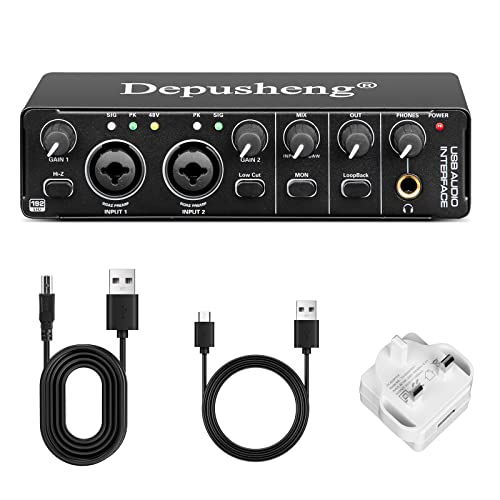
Depusheng RX2 USB Audio Interface
Available immediately
free shipping
  • professional-grade audio recording with 24-bit/192 Hz high analysis sampling rate
  • compatible with Mac OS and Windows XP or above without proprietary drivers
  • transmits audio with ultra-low latency for precise recording and playback
Our rating
9,1
good
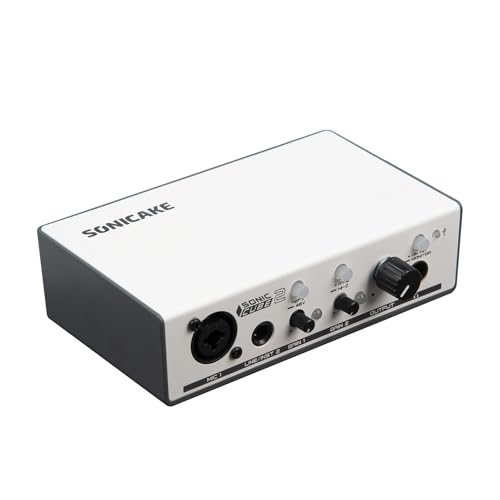
SONICAKE Dual-channel USB Audio Interface
Available immediately
free shipping
  • enables recording and mixing at up to 24bit/48kHz with high-quality audio reproduction and lower noise
  • compatible with universal recording software for Mac and Windows
  • connects to computer for optimal recording quality
Our rating
9,1
good
M-Audio M-Track Solo USB Audio Interface
Available immediately
free shipping
  • 48 kHz audio resolution ensures high-quality sound for recording
  • Compatible with both Mac and PC systems
  • USB/Direct switch provides zero latency monitoring
Our rating
9,1
good
300+ purchases last month
Behringer UMC22 USB Audio Interface
Available immediately
free shipping
  • professional-grade audio quality with Midas-designed mic preamps and 48 kHz resolution
  • compatible with popular recording software such as Avid Pro Tools, Ableton Live, and Steinberg Cubase
  • provides direct monitoring with XLR/TRS inputs and a 1/4 inch instrument input
Our rating
9,0
good
100+ purchases last month
XTUGA Q-12 Audio Interface
Available immediately
free shipping
  • high-performance converter enables recording, mixing and playback in studio quality up to 16-bit/48 kHz for clear and distinctive audio
  • compatible with 48V phantom powered microphones using a standard 3-pin XLR socket and includes an additional 3.5mm microphone jack
  • ,
Our rating
8,6
good
Behringer UCA202 USB Audio Interface
Available immediately
free shipping
  • high-resolution 48 kHz converters provide superior audio quality
  • compatible with PC and Mac without needing setup or drivers
  • dedicated stereo headphone output allows monitoring of both input and output
Our rating
8,6
good

Similar Audio Interface comparisons

Audio Interfaces buying guide: How to choose the right product from the above Audio Interfaces test or comparison

Understanding Audio Interfaces: What They Are and Why You Need One

What is an Audio Interface?

An audio interface is a device that allows you to connect various audio equipment, like microphones and instruments, to your computer. Think of it as a bridge between the sound world and the digital realm. If you want to record music, podcasting, or engage in home studio work, an audio interface ensures that the sound quality is clear and professional.

Why Should You Use One?

Using an audio interface can dramatically improve your sound quality compared to using your computer’s built-in sound card. It provides high-quality preamps for microphones, lower latency during recording, and often additional features for monitoring sound live. If you’ve ever felt frustrated with the sound quality of recordings made directly through a computer, an audio interface could be the upgrade you’re looking for.

Key Features to Look for in an Audio Interface: A Quick Breakdown

Input and Output Options

When selecting an audio interface, consider how many inputs and outputs you’ll need. If you plan to record just a single microphone, a simple two-channel interface will suffice. However, for larger setups, look for models with multiple input options. This is essential if you’re recording a full band or using various instruments.

Audio Quality

Look for an interface that supports high bit and sample rates. This determines the clarity and detail of your recordings. A quality interface will typically offer resolution of at least 24-bit/96 kHz, providing rich sound quality.

Portability and Power Options

Consider how you plan to use your audio interface. If you intend to work on-the-go, opt for a portable model that can be powered via your laptop’s USB port. Such convenience can be a game-changer for mobile recording setups.

User-Friendly Features

Some interfaces come equipped with features like built-in DSP plugins, which allow for real-time sound processing without the need for a computer. Additional features such as headphone outputs, gain knobs, and direct monitoring can enhance your recording experience.

Types of Audio Interfaces: Finding the Best Fit for Your Needs

USB Interfaces

USB interfaces are among the most common and often the most affordable. They connect easily with laptops and desktops and are great for beginners. If you want straightforward functionality without a lot of technical fuss, a USB interface should meet your needs.

Thunderbolt Interfaces

If you’re looking for faster processing and higher performance, Thunderbolt interfaces are worth considering. They offer lower latency and can handle more audio channels simultaneously. However, they may come at a higher price point and require compatible hardware.

Firewire Interfaces

Though less common today, Firewire interfaces can still deliver excellent audio quality and performance. If you have an older computer setup that uses Firewire, it could be a reliable option, although you may find support and availability limited.

Hybrid Interfaces

Hybrid interfaces offer the best of both worlds by supporting multiple connectivity options. Whether you want to connect via USB, Thunderbolt, or even traditional methods, a hybrid model gives you flexibility as your setup evolves.

Setting Up Your Audio Interface: A Simple Step-by-Step Guide

Unboxing and Connecting

Start by unboxing your audio interface and inspecting all the included cables and documentation. To set it up, connect the appropriate cables from your interface to your computer. Once connected, ensure that any required software or drivers are installed.

Configuring Your DAW

Open up your Digital Audio Workstation (DAW) software and navigate to the settings menu. Here, select your audio interface as the input and output device. This configuration will allow your DAW to communicate effectively with the interface.

Testing Your Setup

Before diving into recording, it’s important to test your setup. Connect a microphone or instrument to the interface, check levels, and ensure you can hear the audio through your headphones or speakers. This step ensures everything is functioning correctly.

Maximising Your Audio Interface: Tips for Getting the Best Sound

Use Quality Cables

Investing in quality cables can make a significant difference to your sound quality. Poor cables can introduce noise and signal interference that detracts from your recordings.

Proper Gain Staging

Understanding gain staging is crucial for achieving optimal sound levels. Adjust the gain on your interface so that your audio peaks without clipping. This balance will enhance the clarity and detail of your recordings.

Regular Software Updates

Keep your audio interface’s drivers and software up-to-date. Manufacturer updates can enhance functionality and compatibility with your computer and software. Regular maintenance ensures you’re getting the most current features and performance.

Experiment with Settings

Don’t hesitate to experiment with different settings on your audio interface. Play with monitoring options, effects, and input levels to find what sounds best for your specific recording situation. Each setup is unique, and finding your ideal sound may take some trial and error.


Table of contents
  1. Understanding Audio Interfaces: What They Are and Why You Need One
  2. Key Features to Look for in an Audio Interface: A Quick Breakdown
  3. Types of Audio Interfaces: Finding the Best Fit for Your Needs
  4. Setting Up Your Audio Interface: A Simple Step-by-Step Guide
  5. Maximising Your Audio Interface: Tips for Getting the Best Sound

Overview

1. Comparison winner
UA Volt 1 USB Audio Interface
Our rating
9,8
very good
UA Volt 1 USB Audio InterfaceAvailable immediately
2. Best value
Focusrite Scarlett Solo 3rd Gen Audio Interface
Our rating
9,8
very good
Focusrite Scarlett Solo 3rd Gen Audio InterfaceAvailable immediately
Audient EVO 4 USB Audio Interface
Our rating
9,8
very good
Audient EVO 4 USB Audio InterfaceAvailable immediately
4. Bestseller
Focusrite Scarlett 2i2 4th Gen USB Audio Interface
Our rating
9,8
very good
Focusrite Scarlett 2i2 4th Gen USB Audio InterfaceAvailable immediately
PreSonus Quantum ES 2 USB-C Audio Interface
Our rating
9,6
very good
PreSonus Quantum ES 2 USB-C Audio InterfaceAvailable immediately
PreSonus AudioBox 96 USB Audio Interface
Our rating
9,6
very good
PreSonus AudioBox 96 USB Audio InterfaceAvailable immediately
PreSonus AudioBox GO USB-C Audio Interface
Our rating
9,5
very good
PreSonus AudioBox GO USB-C Audio InterfaceAvailable immediately
Depusheng RX2 USB Audio Interface
Our rating
9,1
good
Depusheng RX2 USB Audio InterfaceAvailable immediately
Our product comparisons are:
Always up to date:
At most every 120 days, we update each category with new products and research developments in the top rankings. This ensures that our recommendations are always up to date
Neutral and independent:
Our tests and comparisons are objective and fact-based. Manufacturers have no influence on the ratings. We aim to provide greater transparency in the market, thereby promoting product quality.
Method-driven
In our tests & comparison tables, we only include products that meet our minimum standards. This ensures that you can find the perfect product for your needs from a wide selection.
Similar tests and comparisons - Music Equipment