Updated:20 October 2026
Rank 1-18 of the best Video Grabbers
Our recommendation Price Customer rating
1. Comparison winner
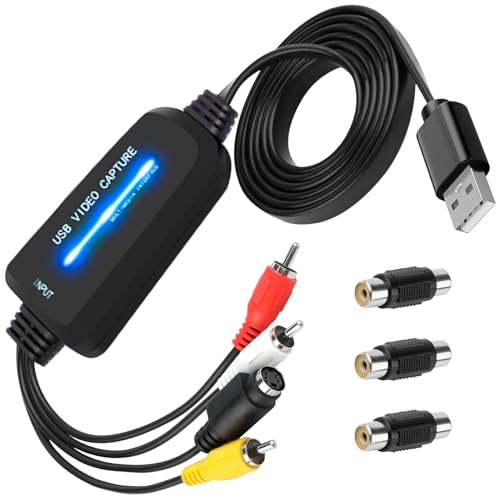
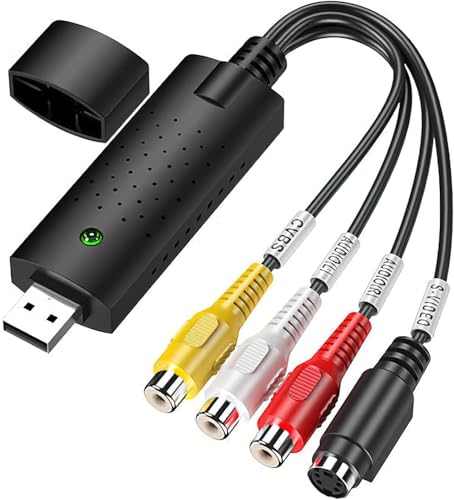
VHS to Digital Converter USB 2.0 Capture Card - 1080p, Plug-and-Play, Windows/Mac, VHS/VCR/DVD/Hi8
Available immediately
free shipping
  • Video and audio format compatibility: supports RCA and S-Video inputs for connecting VHS, VCR, DVD, Hi8 and camcorders, and handles NTSC and PAL video formats
  • Analogue to digital conversion: converts analogue signals from tapes into digital files for storage and sharing
  • USB 2.0 Interface: connects to a computer using a USB 2.0 port for reliable data transfer
Our rating
9,8
very good
ClearClick Video to Digital Converter 3.0
Available immediately
free shipping
  • video format options include MP4 with resolutions of 720x480 or 640x480 pixels
  • converts analogue video and audio sources to digital
  • USB 2.0 interface compatible for direct recording onto USB flash drives or MicroSD cards
Our rating
9,8
very good
3. Best value
BENFEI Capture Card 1080P 60FPS
Available immediately
free shipping
  • video and audio format compatibility: hdmi input supports hdmi 1.4b up to 3840x2160 at 30 Hz with rgb444 ycbcr422 ycbcr444 ycbcr420 in deep colour and audio up to 48 kHz; usb output delivers video at up to 1080p60 with yuv422 or mjpeg
  • usb 2.0 interface: usb type-a or type-c connection enables plug-and-play use with laptops, desktops and tablets
  • video resolution options: supports input up to 4k 3840x2160 at 30 Hz and output up to 1080p60
Our rating
9,8
very good
100+ purchases last month
4. Bestseller
VIXLW Video Grabber Capture Card - VHS/Hi8 to USB Digital Converter (AV to SCART adapter, RCA cable)
Available immediately
free shipping
  • video and audio format compatibility explains which digital formats and video standards the device can encode into and read from; supports MPEG-1 MPEG-2 MPEG-4 AVI WMV DVD ISO and AVC (H.264) encoding and works with PAL NTSC and SECAM colour systems (MESECAM not supported)
  • analog to digital conversion describes how the unit captures analog signals from sources such as VHS VCRs camcorders Mini DV Hi8 DVDs or security cameras and converts them into digital video files for saving on a PC or Mac
  • usb 2.0 interface explains that the device connects to a PC or Mac via high speed USB 2.0 for rapid transfer of digital video data
Our rating
9,8
very good
50+ purchases last month
DIGITNOW! Video Capture Card for VHS/Hi8 to DVD Conversion
Available immediately
free shipping
  • captures video in the universal H.264 digital format, ready for iPad, iMovie, Windows Live Movie Maker, and YouTube
  • convert LPs and audio cassettes to CD or MP3 format with automatic track identification
  • integrates USB 2.0 interface for easy connection to your computer
Our rating
9,8
very good
100+ purchases last month
USB 2.0 Audio Video Grabber Converter, VHS to Digital for Windows PC and Mac
Available immediately
free shipping
  • supports DVD+/-R/RW, DVD+/-VR, and DVD-Video formats
  • converts analogue video to digital format via RCA or S-Video connection
  • USB 2.0 interface allows easy plug-and-play video capture
Our rating
9,6
very good
USB Video Capture Card, RCA to USB Converter, VHS to Digital Converter
Available immediately
free shipping
  • compatible with all video formats including DVD+/-R/RW, DVD+/-VR, and DVD-Video
  • enables conversion of analog signals from video devices to digital format on your PC or laptop
  • connects via USB 2.0 interface for easy plug and play operation
Our rating
9,6
very good
4K HDMI to USB 3.0 Video Capture Card with 1080p/4K Recording, 60fps Live Streaming, 1m USB Cable, Compatible with PS5, Xbox, Windows, Mac and Android
Available immediately
free shipping
  • video and audio format compatibility: supports HDMI input up to 4K (3840x2160) at 60Hz and outputs 1080p at 60fps via USB 3.0, with 8/10/12-bit colour depth and HDMI audio, compatible with OBS, VLC and Amcap on Windows, macOS and Android
  • analogue to digital conversion: not required as HDMI is a digital interface
  • usb 2.0 interface: not supported; relies on USB 3.0 for higher bandwidth
Our rating
9,6
very good
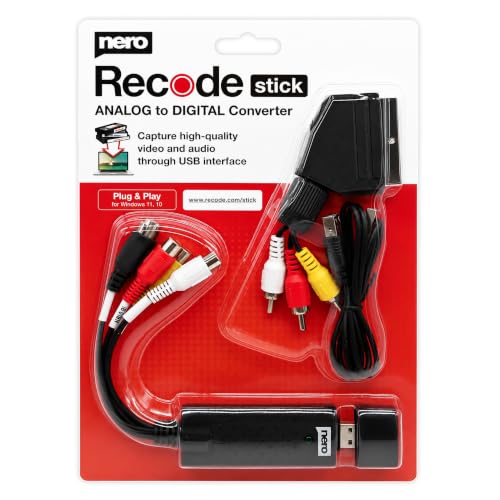
Nero Video Grabber Capture Card
Available immediately
free shipping
  • compatible with analogue video and audio sources like VHS, VCR, camcorders, Hi8, records, and cassettes
  • converts analogue video and music to digital format
  • features a USB 2.0 interface for easy connectivity
Our rating
9,6
very good
Nero USB Video Capture Device – VHS/VCR/Hi8/Super 8 Analogue Tapes to USB (SCART) – Windows 10/11, macOS
Available immediately
free shipping
  • Video and audio format compatibility: records footage from VHS tapes, VCRs, Hi8, Super 8 and camcorders onto your computer
  • Analog to digital conversion: PAL-optimised conversion quality with NTSC recognition for accurate capture from regional video standards
  • USB 2.0 Interface: connects to Windows and macOS computers for quick, driver-free setup
Our rating
9,6
very good
USB Video Capture Card for RCA/AV to PC/Mac – Converts VHS, Mini DV, Hi8 and VCR/DVD to Digital (Windows Vista compatible)
Available immediately
free shipping
  • Video and audio format compatibility with common analogue sources such as VHS, VCR, Hi8 and DV camcorders, with NTSC and PAL video standards
  • Converts analogue RCA composite input into a digital 720p USB signal and captures audio without requiring an external sound card
  • Software compatibility with acquisition software; recommends OBS Studio or PotPlayer on Windows and QuickTime Player on Mac
Our rating
9,6
very good
USB 2.0 Audio Video Grabber for Hi8 VHS to DVD Conversion for Mac and Windows 10
Available immediately
free shipping
  • supports video formats including NTSC, PAL, MPEG4/2/1; compatible with JPEG and BMP image formats
  • converts analogue video to digital format; easily transfer VHS, VCR, and DVD recordings to your PC
  • features USB 2.0 interface for capturing video and audio; no external power supply required
Our rating
9,5
very good
Mokeum USB 2.0 Audio Video Grabber
Available immediately
free shipping
  • compatible with video formats such as VCD, DVD, SVCD, WMV
  • features analog to digital conversion for transferring films from VHS, VCR, DVD to digital storage
  • USB 2.0 interface facilitates easy connection with S-video and composite CVBS devices
Our rating
9,3
good
USB-AV USB 2.0 Audio/Video Grabber Converter, VHS to Digital, UTV007 Chipset
Available immediately
free shipping
  • supports RCA to USB, DVD+/-R/RW, DVD+/-VR, and DVD-Video formats
  • converts analog to digital signals using a USB interface
  • this device connects via USB 2.0 interface
Our rating
9,1
good
HDAKDDHG USB 2.0 Audio Video Grabber
Available immediately
free shipping
  • compatible with video formats including VCD, DVD, SVCD, and WMV
  • supports PAL to record videos at 25 frames per second and NTSC at 30 frames per second
  • USB 2.0 interface for easy connection of S-video and composite CVBS input
Our rating
9,1
good
VHS to Digital Converter USB Video Capture Card with RCA/SCART/AV for Windows XP/Vista
Available immediately
free shipping
  • Video and audio format compatibility: supports NTSC and PAL formats and accepts RCA or S-Video inputs
  • Analogue to digital conversion: digitises analogue tapes into digital files for your PC
  • USB 2.0 interface: provides a fast USB connection between the capture card and your computer
Our rating
9,0
good
USB 2.0 Audio/Video Grabber & Video Capture Adapter (Hi8/VHS to DVD, Scart/AV, Plug & Play) for Mac & Windows 10
Available immediately
free shipping
  • Video and audio format compatibility lets you capture from devices with RCA or S-Video outputs in NTSC PAL SECAM and PAL/60
  • Analogue to digital conversion converts signals from analogue video sources into digital video and audio for use on a computer
  • USB 2.0 interface enables fast plug-and-play connection to the computer for video capture
Our rating
8,9
good
USB 2.0 Audio Video Grabber and Converter
Available immediately
free shipping
  • supports video formats including NTSC, PAL and DVD variations such as DVD+/-R/RW, DVD+/-VR, and DVD-Video
  • converts analogue signals from video devices to digital signal using USB 2.0 interface
  • USB 2.0 interface allows plug and play functionality without external power
Our rating
8,8
good

Similar Video Grabber comparisons

Video Grabbers buying guide: How to choose the right product from the above Video Grabbers test or comparison

Understanding Video Grabbers: What They Are and How They Work

What is a Video Grabber?

A video grabber is a device that allows you to capture video content from various sources, such as DVDs, VHS tapes, cameras, or live TV, and transfer it to your computer or another storage medium. Imagine wanting to digitise old family videos stored on VHS tapes so they can be shared with loved ones or edited for a personal project. A video grabber bridges the gap between these analog formats and digital storage, ensuring memories are preserved in a modern format.

How Do They Work?

Typically, a video grabber connects to your video source via specific input ports, such as USB, HDMI, or composite cables. As you play the video on your source device, the grabber captures the video signal and converts it into a digital format that your computer can understand. This process often involves software that facilitates the transfer, allowing you to preview, edit, or save the video. Picture it as a translator: the video grabber translates the language of analog video into one your computer can read.

Choosing the Right Video Grabber: Key Features to Consider

Compatibility with Devices

When looking for a video grabber, ensure it is compatible with the devices you plan to use it with. Check if the grabber works with your operating system, whether it be Windows or macOS, and if it can connect to your specific video sources such as older camcorders or modern gaming consoles. The right compatibility ensures that you won’t encounter frustrating barriers when trying to capture your video.

Video Quality and Resolution

The video quality is another crucial factor. Most grabbers will specify the maximum resolution they can handle, which can range from standard definition (SD) to high definition (HD) or even 4K. If you want to preserve the original quality of your videos, especially for professional use or high-quality personal projects, look for a grabber that supports higher resolutions.

Ease of Use and Software

Consider how user-friendly the setup and operation of the video grabber is. Some models come with proprietary software that simplifies the capture process, allowing for basic editing and direct saving to your computer. Others might require more technical knowledge. A straightforward interface can significantly enhance your experience, especially if you’re a beginner.

Portability and Design

If you plan to use your video grabber in different locations, its portability may be a crucial consideration. Some devices are compact and lightweight, allowing for easy transport. Additionally, consider the design: a grabber with sturdy build quality and simple connections can make the transferring process smoother.

Top Video Grabber Models: Our Recommendations

Budget-Friendly Option

For those seeking a cost-effective solution, a popular budget-friendly video grabber offers decent quality and essential features. It connects easily to most devices and is ideal for personal use, especially if you’re digitising family videos. While it may not support the highest resolutions, it is perfect for basic capturing needs.

Mid-Range Choice with Enhanced Features

A mid-range video grabber strikes a balance between affordability and advanced functionality. It typically includes support for higher resolutions and better software options, making it suitable for hobbyists who want more control over their projects. Users appreciate its ease of use and the quality of output it provides.

Professional-Grade Model

For professionals or enthusiasts who require superior quality, a high-end video grabber is the best choice. This model often supports 4K resolution and includes advanced editing software. It’s designed for those who need to produce high-quality content, ensuring that every detail is captured and stored accurately.

Setting Up Your Video Grabber: A Step-by-Step Guide

Gather Your Equipment

Start by gathering all necessary equipment: your video grabber, connecting cables, and the source device from which you want to capture video (such as a VHS player or camera). Ensure you have a computer on hand with enough storage space for your video files.

Connect Your Video Sources

Connect the video grabber to your computer as per the instructions provided with the device. For instance, if you’re using a USB grabber, plug it into an available USB port. Next, connect your video source to the grabber using the appropriate cable. If you have a VHS player, this might mean connecting via composite cables.

Install Necessary Software

Install any software that comes with the video grabber on your computer. This will usually include drivers and a video capture application. Follow the prompts during the installation process, which typically includes allowing the software to access your video sources.

Start Capturing Video

Once everything is set up, open the software, and follow the on-screen instructions to start capturing your video. You might want to play your video source beforehand to ensure it’s being detected correctly. With the software running, you can usually see a preview of the video before you commence the capture.

Getting the Most Out of Your Video Grabber: Tips and Tricks

Check Connections Regularly

Ensure all connections are secure before starting a capture session. Loose cables can result in interrupted signals, which may affect the video quality. Regular checks help you avoid common pitfalls.

Use Proper Editing Software

After capturing your video, consider using editing software to enhance the footage. Many video grabbers come with basic editors, but exploring more robust software can open up creative possibilities for your videos. Look for software that integrates easily with your grabber.

Explore Formats and Compression

Familiarising yourself with different video formats and compression settings can improve workflow. Depending on your needs, you might want to save videos in different formats for sharing or storage. Understanding these options can help maintain the quality while managing file sizes.


Table of contents
  1. Understanding Video Grabbers: What They Are and How They Work
  2. Choosing the Right Video Grabber: Key Features to Consider
  3. Top Video Grabber Models: Our Recommendations
  4. Setting Up Your Video Grabber: A Step-by-Step Guide
  5. Getting the Most Out of Your Video Grabber: Tips and Tricks

Overview

1. Comparison winner
VHS to Digital Converter USB 2.0 Capture Card - 1080p, Plug-and-Play, Windows/Mac, VHS/VCR/DVD/Hi8
Our rating
9,8
very good
VHS to Digital Converter USB 2.0 Capture Card - 1080p, Plug-and-Play, Windows/Mac, VHS/VCR/DVD/Hi8Available immediately
ClearClick Video to Digital Converter 3.0
Our rating
9,8
very good
ClearClick Video to Digital Converter 3.0Available immediately
3. Best value
BENFEI Capture Card 1080P 60FPS
Our rating
9,8
very good
BENFEI Capture Card 1080P 60FPSAvailable immediately
4. Bestseller
VIXLW Video Grabber Capture Card - VHS/Hi8 to USB Digital Converter (AV to SCART adapter, RCA cable)
Our rating
9,8
very good
VIXLW Video Grabber Capture Card - VHS/Hi8 to USB Digital Converter (AV to SCART adapter, RCA cable)Available immediately
DIGITNOW! Video Capture Card for VHS/Hi8 to DVD Conversion
Our rating
9,8
very good
DIGITNOW! Video Capture Card for VHS/Hi8 to DVD ConversionAvailable immediately
USB 2.0 Audio Video Grabber Converter, VHS to Digital for Windows PC and Mac
Our rating
9,6
very good
USB 2.0 Audio Video Grabber Converter, VHS to Digital for Windows PC and MacAvailable immediately
USB Video Capture Card, RCA to USB Converter, VHS to Digital Converter
Our rating
9,6
very good
USB Video Capture Card, RCA to USB Converter, VHS to Digital ConverterAvailable immediately
4K HDMI to USB 3.0 Video Capture Card with 1080p/4K Recording, 60fps Live Streaming, 1m USB Cable, Compatible with PS5, Xbox, Windows, Mac and Android
Our rating
9,6
very good
4K HDMI to USB 3.0 Video Capture Card with 1080p/4K Recording, 60fps Live Streaming, 1m USB Cable, Compatible with PS5, Xbox, Windows, Mac and AndroidAvailable immediately
Our product comparisons are:
Always up to date:
At most every 120 days, we update each category with new products and research developments in the top rankings. This ensures that our recommendations are always up to date
Neutral and independent:
Our tests and comparisons are objective and fact-based. Manufacturers have no influence on the ratings. We aim to provide greater transparency in the market, thereby promoting product quality.
Method-driven
In our tests & comparison tables, we only include products that meet our minimum standards. This ensures that you can find the perfect product for your needs from a wide selection.
Similar tests and comparisons - TV Accessories & Video Converters