Updated:20 October 2026
Rank 1-17 of the best Wireless Mice
Our recommendation Price Customer rating
1. Comparison winner
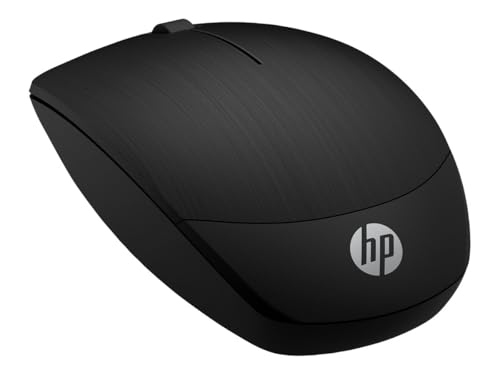
HP Wireless Mouse X200
Available immediately
free shipping
  • adjustable tracking speed with DPI settings of 800/1200/1600
  • comfortable contoured design for ergonomic use
  • reliable wireless connection via 2.4GHz
Our rating
9,8
very good
HP 280 Silent Wireless Mouse
Available immediately
free shipping
  • ergonomically designed for all-day comfort
  • reliable connection with 2.4GHz wireless dongle
  • battery life lasts up to 18 months
Our rating
9,8
very good
Logitech M240 Silent Bluetooth Mouse, Graphite
Available in a few days
free shipping
  • slim and ambidextrous design for natural hand positioning
  • connects via Bluetooth technology
  • up to 18-month battery life with auto sleep feature
Our rating
9,6
very good
4. Best value
TECKNET Bluetooth Mouse 4800DPI Wireless
Available immediately
free shipping
  • six adjustable DPI levels allow you to adjust the cursor sensitivity for different tasks or preferences
  • ergonomic shape reduces hand fatigue and provides comfortable palm support
  • offers 2.4GHz and Bluetooth 5.0/3.0 connectivity for versatility with multiple devices
Our rating
9,6
very good
500+ purchases last month
5. Bestseller
Logitech Signature M650 Wireless Mouse
Available immediately
free shipping
  • adjustable cursor sensitivity for precision in documents and fast scrolling for web pages
  • ergonomic shape with soft thumb area and rubber side grips for comfort during long use
  • connect via bluetooth or 2.4ghz usb receiver according to your preference
Our rating
9,6
very good
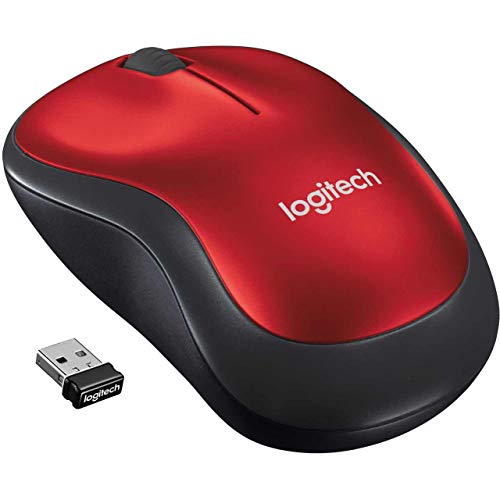
Logitech M185 Wireless Mouse - Red
Available immediately
free shipping
  • cursor sensitivity with a dpi level of 1000
  • ergonomic design with ambidextrous shape for comfortable use in either hand
  • connectivity options include 2.4ghz wireless with a nano usb receiver
Our rating
9,6
very good
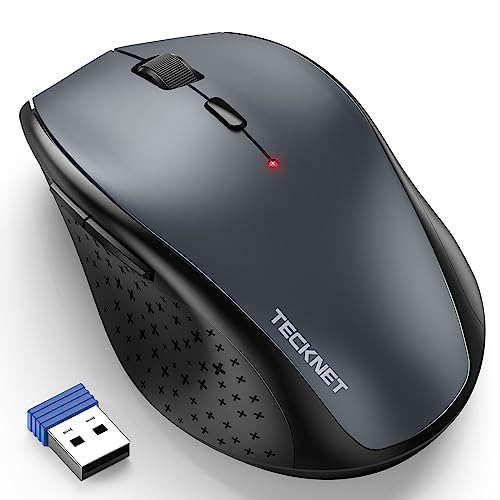
TECKNET Wireless Mouse 4800 DPI, Grey
Available immediately
free shipping
  • offers 6 DPI levels (800/1200/1600/2400/3200/4800) for adjustable cursor sensitivity
  • ergonomically designed with a streamlined arc and finger rest for reduced stress during prolonged use
  • connects via 2.4GHz wireless with a range of up to 15 metres
Our rating
9,6
very good
Anker AK-UBA Wireless Vertical Ergonomic Mouse
Available immediately
free shipping
  • cursor sensitivity with adjustable DPI levels of 800, 1200, and 1600 for smooth and precise tracking on various surfaces
  • ergonomic design promotes a healthy neutral handshake wrist and arm position for comfortable use
  • connectivity through 2.4GHz USB receiver for easy wireless connection
Our rating
9,6
very good
Logitech M650 L Wireless Mouse for Large Hands
Available immediately
free shipping
  • cursor sensitivity with adjustable DPI levels for tailored performance
  • ergonomic design with a contoured shape, thumb area and rubber side grips for comfort during long use
  • connect via Bluetooth or 2.4GHz Logi Bolt USB receiver for flexibility
Our rating
9,5
very good
INPHIC Wireless Mouse, Ultra Slim 1600 DPI, Black
Available immediately
free shipping
  • adjustable cursor sensitivity with DPI levels of 1000, 1200, and 1600 for customised speed
  • ergonomic design that is ultra-slim and lightweight, ideal for travel or extended use
  • connectivity options include 2.4GHz wireless for easy plug-and-play
Our rating
9,4
good
300+ purchases last month
HP 150 Wireless Mouse, Black
Available immediately
free shipping
  • 1600 DPI optical sensor offers accurate tracking on most surfaces
  • Ergonomic design for comfortable all-day use
  • 2.4 GHz wireless connection via dongle for clutter-free experience
Our rating
9,3
good
400+ purchases last month
Rechargeable Wireless Mouse with 2.4G & Bluetooth, 1600 DPI
Available immediately
free shipping
  • cursor sensitivity for precise control and smooth operation
  • ergonomic design with a slim, sweat-resistant shape for comfort and support
  • connectivity options with a dual mode wireless feature allowing Bluetooth 5.0 and 2.4GHz USB receiver connection
Our rating
9,1
good
UGREEN Wireless Mouse 4000 DPI
Available immediately
free shipping
  • cursor sensitivity with 4000 DPI and 5 adjustable settings for precise control
  • ergonomic design ensures comfort with extra grip and palm support
  • 2.4GHz wireless connection with up to 15m range
Our rating
9,0
good
Logitech M185 Wireless Mouse
Available immediately
free shipping
  • cursor sensitivity: adjustable up to 1000 dpi for smooth tracking
  • ergonomic design: contoured shape for comfortable use with either hand
  • connectivity options: wireless connection with nano USB receiver within a 10-metre range
Our rating
9,0
good
Trust Silent Wireless Mouse
Available immediately
free shipping
  • Adjustable cursor sensitivity with 800/1600 DPI levels
  • Ergonomic design with rubber sides for a comfortable and secure grip, suitable for both left and right-handed users
  • Connectivity options via Bluetooth or 2.4GHz for flexible use
Our rating
8,9
good
Wireless Mouse 2.4G with USB Nano Receiver (Black)
Available immediately
free shipping
  • adjustable cursor sensitivity with 800, 1200, and 1600 DPI levels
  • slim design with a sweat-resistant and skin-friendly finish for comfort
  • connectivity via reliable Bluetooth and 2.4GHz wireless options
Our rating
8,8
good
Amazon Basics Wireless Mouse for Laptop
Available immediately
free shipping
  • adjustable cursor sensitivity for smooth and precise control
  • ergonomic design for comfortable use
  • connects via 2.4 GHz wireless with a USB-A nano receiver
Our rating
8,8
good

Similar Wireless Mouse comparisons

Wireless Mice buying guide: How to choose the right product from the above Wireless Mice test or comparison

Understanding the Benefits of a Wireless Mouse: Experience Freedom in Movement

Enjoy Unrestricted Navigation

Using a wireless mouse offers incredible freedom in movement. Without being tethered to your computer, you can sit comfortably on your couch or move around the room while still controlling your cursor with ease. This is particularly useful during presentations or when sharing your screen with others, as it allows you to highlight important points without needing to stay at your desk.

Reduced Clutter and Improved Aesthetics

A wireless mouse eliminates the need for a tangled mess of wires on your desk. This not only creates a neater workspace but also reduces distractions. A clean and organised environment can enhance productivity and create a more enjoyable work experience. You’ll appreciate having a clean look without compromising functionality.

Portability and Convenience

Wireless mice are designed to be portable. Whether you are working from a café or travelling, enjoying the convenience of a mouse that fits easily into your laptop bag is a significant advantage. Many models are compact and lightweight, making them an ideal choice for on-the-go professionals as well as students.

Key Features to Look For: What Makes a Wireless Mouse Stand Out

Sensor Technology and Precision

When selecting a wireless mouse, pay close attention to the sensor quality. Optical and laser sensors provide different levels of precision, with laser sensors typically being more versatile across surfaces. This means a mouse with a high-quality sensor will allow for smoother movements and greater accuracy, which is especially important for tasks requiring fine detail, like graphic design.

Battery Life Considerations

Battery life should be an important factor in your decision. Some wireless mice use standard batteries, while others come with rechargeable options. Consider how often you want to change batteries or plug in your mouse. A model with a long battery life offers convenience, allowing you to keep working without repeated interruptions to recharge.

Ergonomics for Comfortable Use

The shape and design of a wireless mouse can significantly affect your comfort during use. Look for an ergonomic design that fits comfortably in your hand, especially if you spend long hours at your computer. A well-designed mouse will reduce strain on your wrist and fingers, making your work sessions more enjoyable without discomfort.

Choosing the Right Wireless Mouse for Your Needs: Simple Tips for Everyone

Identify Your Primary Usage

Start by thinking about how you will primarily use the mouse. If you’re gaming, look for features like adjustable DPI settings that allow for speedy or precision movements. For everyday tasks like browsing and office work, a basic wireless mouse with standard functionalities will suffice. Knowing your primary usage will help narrow down your options.

Wireless Connectivity Options

Most wireless mice connect via Bluetooth or a USB receiver. If your devices support Bluetooth, you may prefer a Bluetooth mouse to keep your USB ports free for other uses. Additionally, some mice offer dual connectivity, allowing flexibility. We recommend considering your existing devices to determine the best connection type for you.

Comparing Sizes and Weights

Make sure to consider the size and weight of the mouse. If you have larger hands or prefer a heavier mouse for stability, choose one that fits those preferences. Conversely, if you’re looking for portability, opt for a smaller model. You’ve got to feel comfortable using it, as it can dramatically impact your productivity.

Setting Up Your Wireless Mouse: A Step-by-Step Approach to Start Using It

Unboxing and Inserting Batteries

After purchasing your wireless mouse, the first step is to unpack it and insert the required batteries. Ensure you follow the instructions provided, as some models have specific requirements for battery orientation.

Connecting to Your Device

Next, it’s time to connect your mouse to your device. If using a USB receiver, insert it into a free port on your computer. For Bluetooth models, go to the Bluetooth settings on your device, turn it on, and search for available devices. Once your mouse appears, select it to connect.

Testing and Adjusting Settings

Once connected, test the mouse to ensure it’s working as expected. You might want to adjust settings like sensitivity or scrolling speed through your device’s control panel. This way, you can configure it to your preferences for optimum comfort and efficiency.

Maintaining Your Wireless Mouse: Easy Hacks for Longevity and Performance

Cleaning Regularly for Optimal Performance

To keep your mouse functioning well, it’s essential to clean it regularly. Dust and debris can accumulate, affecting performance. Use a soft cloth to wipe down the surface and ensure that the sensor is clear of obstructions for smooth operation. Simple cleaning can extend the life of your device significantly.

Proper Battery Care

If your mouse runs on batteries, take care to replace them promptly, as low battery levels can cause erratic behaviour. If using a rechargeable model, make it a habit to charge it regularly and avoid completely draining the battery to ensure a longer lifespan.

Safe Storage Practices

When not in use, store your mouse safely. If it has an on/off switch, make sure to turn it off to save power. Even if it’s designed for prolonged use, this can help preserve battery life and keep your device in good condition. Proper storage can prevent unnecessary wear and tear.


Table of contents
  1. Understanding the Benefits of a Wireless Mouse: Experience Freedom in Movement
  2. Key Features to Look For: What Makes a Wireless Mouse Stand Out
  3. Choosing the Right Wireless Mouse for Your Needs: Simple Tips for Everyone
  4. Setting Up Your Wireless Mouse: A Step-by-Step Approach to Start Using It
  5. Maintaining Your Wireless Mouse: Easy Hacks for Longevity and Performance

Overview

1. Comparison winner
HP Wireless Mouse X200
Our rating
9,8
very good
HP Wireless Mouse X200Available immediately
HP 280 Silent Wireless Mouse
Our rating
9,8
very good
HP 280 Silent Wireless MouseAvailable immediately
Logitech M240 Silent Bluetooth Mouse, Graphite
Our rating
9,6
very good
Logitech M240 Silent Bluetooth Mouse, GraphiteAvailable in a few days
4. Best value
TECKNET Bluetooth Mouse 4800DPI Wireless
Our rating
9,6
very good
TECKNET Bluetooth Mouse 4800DPI WirelessAvailable immediately
5. Bestseller
Logitech Signature M650 Wireless Mouse
Our rating
9,6
very good
Logitech Signature M650 Wireless MouseAvailable immediately
Logitech M185 Wireless Mouse - Red
Our rating
9,6
very good
Logitech M185 Wireless Mouse - RedAvailable immediately
TECKNET Wireless Mouse 4800 DPI, Grey
Our rating
9,6
very good
TECKNET Wireless Mouse 4800 DPI, GreyAvailable immediately
Anker AK-UBA Wireless Vertical Ergonomic Mouse
Our rating
9,6
very good
Anker AK-UBA Wireless Vertical Ergonomic MouseAvailable immediately
Our product comparisons are:
Always up to date:
At most every 120 days, we update each category with new products and research developments in the top rankings. This ensures that our recommendations are always up to date
Neutral and independent:
Our tests and comparisons are objective and fact-based. Manufacturers have no influence on the ratings. We aim to provide greater transparency in the market, thereby promoting product quality.
Method-driven
In our tests & comparison tables, we only include products that meet our minimum standards. This ensures that you can find the perfect product for your needs from a wide selection.
Similar tests and comparisons - PC & Laptop Add-ons