Updated:31 October 2026
Rank 1-14 of the best Mesh Wi-Fis
Our recommendation Price Customer rating
1. Comparison winner
TP-Link Deco X60 AX5400 Wi-Fi 6 Mesh System, 3-Pack
Available immediately
free shipping
  • whole-home coverage with enhanced Wi-Fi signal strength using Wi-Fi 6
  • mesh speeds up to 5,400 Mbps for responsive gaming and video chatting
  • compatible with multiple units for seamless network transitions
Our rating
9,8
very good
50+ purchases last month
Amazon Eero 6+ Mesh Wi-Fi Router 3-Pack
Available immediately
free shipping
  • covers a wide range and supports Wi-Fi speeds up to a gigabit
  • additional Wi-Fi bandwidth on the 160 MHz channel for faster connectivity
  • compatible with Thread and Zigbee devices and expandable with Alexa integration
Our rating
9,8
very good
3. Best value
TP-Link Deco BE25 BE3600 Wi-Fi 7 Mesh System, 3-Pack
Available immediately
free shipping
  • provides a combined wireless speed of 3.6 Gbps with coverage across dual bands, offering 2882 Mbps on 5 GHz band and 688 Mbps on 2.4 GHz band
  • features 2.5 Gbps wired connections through two ports for flexible and fast internet sharing
  • compatible with all generations of WiFi, working with any internet service provider and modem
Our rating
9,6
very good
TP-Link Deco XE75 Pro 3-Pack Tri-Band Wi-Fi 6E Mesh System
Available immediately
free shipping
  • covers up to 670 square metres with seamless Wi-Fi to eliminate dead zones and buffering
  • tri-band Wi-Fi with speeds up to 5,400 Mbps supports up to 200 devices
  • backward compatible with all Wi-Fi generations and works with any internet service provider and modem
Our rating
9,6
very good
5. Bestseller
TP-Link Deco X10 AX1500 Wi-Fi 6 Mesh System, 3-Pack
Available immediately
free shipping
  • whole home Wi-Fi coverage with improved signal strength using Wi-Fi 6
  • Wi-Fi 6 provides speeds up to 1,500 Mbps: 1,201 Mbps on 5 GHz and 300 Mbps on 2.4 GHz
  • create a unified network with automatic selection of the best connection
Our rating
9,6
very good
ASUS ROG Rapture GT6 Tri-Band WiFi 6 Mesh System, 1 Pack
Available in a few days
free shipping
  • Covers up to 5,800 square feet with nine internal antennas
  • Provides ultrafast speeds of up to 10,000 Mbps through tri-band WiFi 6 and 160 MHz channels
  • Supports fast wired connectivity with 2.5 Gbps WAN port and LAN aggregation
Our rating
9,6
very good
Amazon eero 6 Mesh Wi-Fi Router, 3-Pack
Available immediately
free shipping
  • mesh Wi-Fi coverage for homes up to 420 m²
  • Wi-Fi 6 supports speeds up to 500 Mbps and connections for more than 75 devices
  • works as a Zigbee smart home hub for compatible Alexa devices and can be expanded with compatible eero products
Our rating
9,6
very good
TP-Link Deco S7 AC1900 Mesh Wi-Fi System (3-Pack)
Available immediately
free shipping
  • seamless coverage with advanced mesh technology for uninterrupted connection
  • wifi speeds up to 1900 mbps, enabling 4k streaming and smooth online activities
  • compatible with up to 150 devices and includes three gigabit ethernet ports
Our rating
9,5
very good
NETGEAR Orbi 770 Series WiFi 7 Mesh System, 3-Pack (RBE773)
Available immediately
free shipping
  • provides WiFi coverage throughout your home, including outdoor spaces, with speeds up to 11Gbps
  • WiFi 7 technology offers speeds 2.4 times faster than WiFi 6 and is compatible with previous WiFi standards
  • usable with any internet service provider, supporting internet plans up to 2.5Gbps and offers multiple Ethernet ports for reliable wired connections
Our rating
9,5
very good
100+ purchases last month
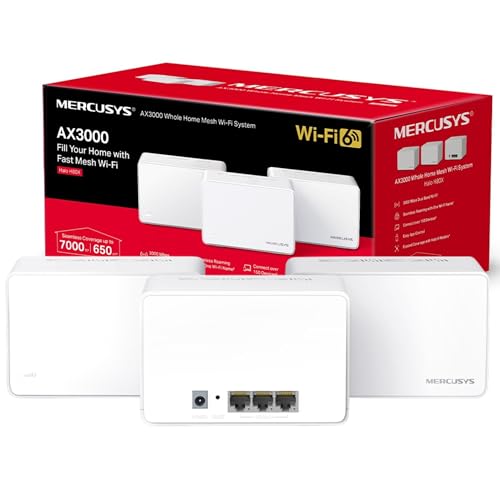
MERCUSYS Halo H80X Mesh WiFi 6 System, 3-Pack, AX3000Mbps
Available immediately
free shipping
  • Provides whole home coverage for up to 650 square metres, eliminating WiFi dead zones
  • Dual band WiFi 6 speeds up to 3000 Mbps: 2402 Mbps on 5 GHz and 574 Mbps on 2.4 GHz
  • Supports over 150 devices for fast and stable connections
Our rating
9,5
very good
TP-Link Deco M4 AC1200 Mesh Wi-Fi System (3-Pack)
Available immediately
free shipping
  • provides seamless Wi-Fi coverage for medium to large rooms without the need for boosters, allowing 100+ devices to connect simultaneously
  • offers high-speed connections by automatically selecting the fastest path for device connections
  • compatible with Amazon Echo and Alexa for voice-controlled network management
Our rating
9,5
very good
400+ purchases last month
TP-Link Deco X55 AX3000 Mesh Wi-Fi 6 System (3-Pack)
Available immediately
free shipping
  • provides seamless mesh Wi-Fi coverage up to 6,500 ft2 with 3 units
  • offers super-fast Wi-Fi 6 speeds up to 3.0 Gbps with dual band support
  • features 3dGigabit ports per unit for ample connectivity options
Our rating
9,3
good
500+ purchases last month
MERCUSYS Halo H60X AX1500 Wi-Fi 6 Mesh System (3-Pack)
Available immediately
free shipping
  • Provides Wi-Fi coverage across up to 550 m², suitable for large homes with up to four floors
  • Dual-band Wi-Fi 6 delivers speeds of up to 1,501 Mbps, with up to 1,201 Mbps on 5 GHz and 300 Mbps on 2.4 GHz
  • Supports more than 100 connected devices and allows coverage to be expanded with additional Mercusys Halo nodes; Halo H series and S series nodes are not compatible with each other
Our rating
9,0
good
100+ purchases last month
MERCUSYS Halo H50G AC1900 Mesh Wi-Fi System, 3-Pack
Available immediately
free shipping
  • Covers up to 550 m² with a mesh network that uses one Wi-Fi name and password across the home
  • Dual-band Wi-Fi provides speeds of up to 1,900 Mbps and supports more than 100 connected devices
  • Works with major internet service providers and modems; each Halo unit has three Gigabit Ethernet ports for wired connections
Our rating
8,9
good
100+ purchases last month

Similar Mesh Wi-Fi comparisons

Mesh Wi-Fis buying guide: How to choose the right product from the above Mesh Wi-Fis test or comparison

Understanding Mesh Wi-Fi: How It Works and Why You Need It

What is Mesh Wi-Fi?

Mesh Wi-Fi is a modern approach to home networking that uses multiple devices, called nodes, to create a single, cohesive network. Unlike traditional routers that broadcast signals from one central point, mesh systems use several units placed around your home to ensure strong and even coverage throughout every room. Imagine the difference between having to rely on a single beach umbrella (the traditional router) versus a row of sunshades scattered across the beach (the mesh system). With mesh Wi-Fi, you eliminate dead zones where the internet signal is weak or non-existent.

How Does It Work?

In a mesh network, each node communicates with the others, relaying data back and forth to maintain a strong connection. This interconnected system allows devices to connect to the nearest node, optimising the signal strength and providing seamless connectivity as you move around your home. If you’ve ever experienced your wifi signal dropping as you walk from one room to another, a mesh system can solve that problem by keeping you connected no matter where you are.

Key Benefits of Mesh Wi-Fi: Seamless Connectivity for Your Home

Elimination of Dead Zones

One of the primary benefits of mesh Wi-Fi is its ability to eliminate dead zones. With a traditional router, certain areas of your home, especially those farthest from the router, may struggle to get a good signal. Mesh networks are designed to distribute the signal evenly, so no matter where you are—whether in the basement or the attic—you should experience a strong, reliable connection.

Improved Speed and Performance

Mesh Wi-Fi also offers improved speed compared to traditional systems. By having multiple nodes working together, the network can handle more devices and more data. This is especially important for homes with multiple users streaming videos, gaming, or working from home simultaneously. You won’t have to deal with lag or buffering as often, ensuring a smoother online experience.

User-Friendly Management

Most mesh Wi-Fi systems come with user-friendly management apps that make setup and maintenance straightforward. These apps allow us to monitor our network, manage devices connected to it, and even set parental controls, all in one place. This simplicity is particularly beneficial for those who may not be tech-savvy, as it takes the guesswork out of managing our home network.

Choosing the Right Mesh Wi-Fi System: What to Consider

Size of Your Home

When selecting a mesh Wi-Fi system, it’s crucial to consider the size and layout of your home. The number of nodes you need will depend on how far apart the rooms are and how many floors there are. For smaller homes, a two-node system may suffice, while larger homes, particularly those with multiple stories, may require three or more nodes for optimal coverage.

Device Compatibility

Next, we should think about device compatibility. Mesh systems can typically support a wide range of devices, but it’s wise to check if the system you’re considering can handle all the devices in your household. This is especially important in homes with smart devices such as thermostats, lights, and security cameras, which can add to the load on your network.

Budget Considerations

Lastly, set a budget for your mesh Wi-Fi system. Prices can vary significantly based on the features and number of nodes included. While it may be tempting to go for the least expensive option, investing a bit more can provide us with longer-range, faster performance, and better overall value in the long run.

Setting Up Your Mesh Wi-Fi: A Step-by-Step Guide

Unboxing Your System

Once your new mesh Wi-Fi system arrives, start by unboxing all the components. Typically, you’ll find at least two nodes, power adapters, and an instruction manual. It’s a good practice to lay everything out and familiarise ourselves with each part before we dive into the setup process.

Connecting the Main Node

The first step in setup is to connect the main node to our modem. This node usually requires a wired connection, so plug it into the modem using an Ethernet cable. After connecting, plug the node into a power socket and wait for it to light up, indicating it’s powered on and ready to go.

Setting Up the Second Node

Once the primary node is ready, we can move on to the second node. Place it in an area where you want to extend the signal. Ensure that it is within range of the main node. Plug it in and use the provided app to connect it to the main node. The app will guide us through the remaining steps to finish setting up the network.

Testing the Coverage

After everything is set up, it’s important to test the coverage throughout our home. Walk to different areas, using our devices to check the strength and speed of the connection. If some areas are lacking, consider adjusting the placement of the nodes for better distribution or adding another node if necessary.

Top Recommendations for Mesh Wi-Fi Systems: Our Buying Picks

High Performance for Larger Homes

For those with larger homes, we recommend looking into systems like the AC2200, which is known for its exceptional coverage and speed. It comes with three nodes that communicate seamlessly, making it an excellent choice for families needing reliable internet across multiple floors.

Best Value for Medium-Sized Houses

For medium-sized houses, consider the AC1200 system. This set offers a good balance of performance and affordability, ensuring adequate coverage without breaking the bank. It’s user-friendly and perfect for households with moderate internet usage like streaming and browsing.

Ideal for Small Apartments

If you live in a small apartment, we suggest the dual-band mesh Wi-Fi system. Offering robust performance tailored for compact spaces, this option is often compact and easy to install, ensuring you get great connectivity without excessive equipment taking up space.


Table of contents
  1. Understanding Mesh Wi-Fi: How It Works and Why You Need It
  2. Key Benefits of Mesh Wi-Fi: Seamless Connectivity for Your Home
  3. Choosing the Right Mesh Wi-Fi System: What to Consider
  4. Setting Up Your Mesh Wi-Fi: A Step-by-Step Guide
  5. Top Recommendations for Mesh Wi-Fi Systems: Our Buying Picks

Overview

1. Comparison winner
TP-Link Deco X60 AX5400 Wi-Fi 6 Mesh System, 3-Pack
Our rating
9,8
very good
TP-Link Deco X60 AX5400 Wi-Fi 6 Mesh System, 3-PackAvailable immediately
Amazon Eero 6+ Mesh Wi-Fi Router 3-Pack
Our rating
9,8
very good
Amazon Eero 6+ Mesh Wi-Fi Router 3-PackAvailable immediately
3. Best value
TP-Link Deco BE25 BE3600 Wi-Fi 7 Mesh System, 3-Pack
Our rating
9,6
very good
TP-Link Deco BE25 BE3600 Wi-Fi 7 Mesh System, 3-PackAvailable immediately
TP-Link Deco XE75 Pro 3-Pack Tri-Band Wi-Fi 6E Mesh System
Our rating
9,6
very good
TP-Link Deco XE75 Pro 3-Pack Tri-Band Wi-Fi 6E Mesh SystemAvailable immediately
5. Bestseller
TP-Link Deco X10 AX1500 Wi-Fi 6 Mesh System, 3-Pack
Our rating
9,6
very good
TP-Link Deco X10 AX1500 Wi-Fi 6 Mesh System, 3-PackAvailable immediately
ASUS ROG Rapture GT6 Tri-Band WiFi 6 Mesh System, 1 Pack
Our rating
9,6
very good
ASUS ROG Rapture GT6 Tri-Band WiFi 6 Mesh System, 1 PackAvailable in a few days
Amazon eero 6 Mesh Wi-Fi Router, 3-Pack
Our rating
9,6
very good
Amazon eero 6 Mesh Wi-Fi Router, 3-PackAvailable immediately
TP-Link Deco S7 AC1900 Mesh Wi-Fi System (3-Pack)
Our rating
9,5
very good
TP-Link Deco S7 AC1900 Mesh Wi-Fi System (3-Pack)Available immediately
Our product comparisons are:
Always up to date:
At most every 120 days, we update each category with new products and research developments in the top rankings. This ensures that our recommendations are always up to date
Neutral and independent:
Our tests and comparisons are objective and fact-based. Manufacturers have no influence on the ratings. We aim to provide greater transparency in the market, thereby promoting product quality.
Method-driven
In our tests & comparison tables, we only include products that meet our minimum standards. This ensures that you can find the perfect product for your needs from a wide selection.
Similar tests and comparisons - Technology Products