Updated:04 October 2026
Rank 1-14 of the best Tp-Link Routers
Our recommendation Price Customer rating
1. Comparison winner
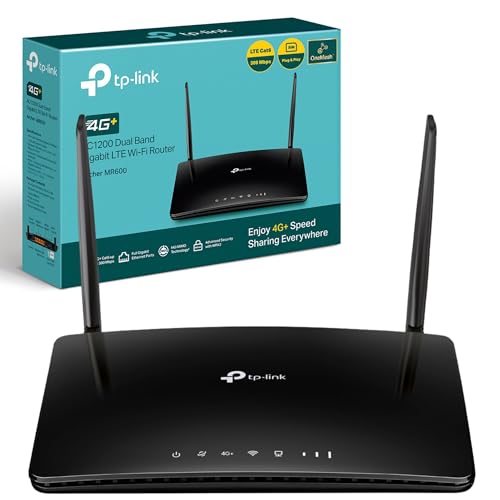
TP-Link Archer MR600 Gigabit Router
Available immediately
free shipping
  • data speeds up to 300 mbps supported
  • compatible with dual-band frequencies for optimised connections
  • mesh network compatible for seamless whole-home coverage
Our rating
9,6
very good
300+ purchases last month
2. Best value
TP-Link Archer AX23 Wi-Fi 6 Router
Available immediately
free shipping
  • Wi-Fi speeds up to 1.8 Gbps
  • dual-band functionality with OFDMA technology for improved uplink and downlink transmission
  • compatible with EasyMesh for seamless whole-home coverage
Our rating
9,6
very good
TP-Link Archer NX210 Wi-Fi 6 5G Router
Available immediately
free shipping
  • download speeds up to 4.67 Gbps for fast file downloads and smooth video streaming
  • dual-band Wi-Fi with up to 1201 Mbps on 5 GHz and 574 Mbps on 2.4 GHz
  • compatible with EasyMesh products for flexible and seamless whole-home coverage
Our rating
9,6
very good
400+ purchases last month
4. Bestseller
TP-Link Archer MR500 AC1200 4G+ Router
Available immediately
free shipping
  • data speeds of up to 300 mbps
  • works with dual-band networks
  • compatible with mesh networks for expanded coverage
Our rating
9,6
very good
50+ purchases last month
TP-Link Deco X50-5G AX3000 Whole Home Wi-Fi 6 Router
Available immediately
free shipping
  • 5G technology increases download speeds up to 3.4 Gbps with low latency for a fast and responsive connection
  • dual-band Wi-Fi 6 offers speeds of 2402 Mbps on 5 GHz and 574 Mbps on 2.4 GHz
  • ensures strong Wi-Fi signal coverage throughout the home
Our rating
9,5
very good
100+ purchases last month
TP-Link Archer AX1800 WiFi 6 Router
Available immediately
free shipping
  • fast wi-fi speeds of up to 1.8 gbps for smooth streaming, downloading, and gaming without buffering
  • connects to devices on both 2.4 ghz and 5 ghz bands to reduce interference and improve performance
Our rating
9,4
good
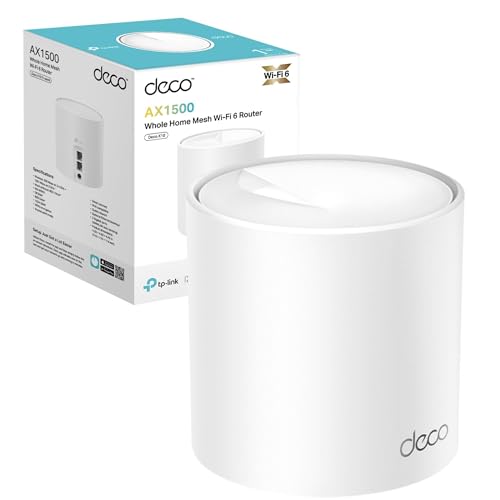
TP-Link Deco X10 WiFi 6 Mesh Router System
Available immediately
free shipping
  • WiFi speed up to 1500 megabits per second with 1201 megabits per second on 5 gigahertz and 300 megabits per second on 2.4 gigahertz
  • dual-band function for enhanced coverage, supporting multiple devices with reliable performance
  • compatible with mesh networks for seamless expansion of WiFi coverage
Our rating
9,4
good
300+ purchases last month
TP-Link Archer C6 WiFi Router
Available immediately
free shipping
  • transfer speed of 867 mbps on 5 ghz and 300 mbps on 2.4 ghz
  • supports dual-band function for improved connection flexibility
  • designed to work seamlessly with mesh networks
Our rating
9,3
good
500+ purchases last month
TP-Link Archer AX55 WiFi 6 Router
Available immediately
free shipping
  • speed: delivers up to 2402 Mbps on the 5 GHz band and 574 Mbps on the 2.4 GHz band for smoother streaming and quicker downloads
  • dual-band capability lets you connect more devices while maintaining optimal performance
  • usb ports: connect external storage devices for quick file, photo, and video sharing
Our rating
9,3
good
TP-Link Archer AX18 WiFi 6 Router - AX1500 Mbps, Gigabit Ethernet
Available immediately
free shipping
  • up to 1.5 Gbps speeds with dual-band functionality
  • includes dual-band functionality with speeds of 1201 Mbps on 5 GHz and 300 Mbps on 2.4 GHz
  • compatibility with mesh networks for enhanced coverage
Our rating
9,1
good
TP-Link Archer VR400 AC1200 Modem Router
Available immediately
free shipping
  • up to 867 Mbps on 5 GHz and 300 Mbps on 2.4 GHz for speedy wireless connections
  • dual band offers flexibility and minimised interference
  • compatible with mesh networks for seamless home coverage
Our rating
9,0
good
TP-Link TL-MR6400 4G WiFi Router
Available immediately
free shipping
  • download speeds up to 150 Mbps
  • ability to support both 2.4GHz and 5GHz frequency bands
  • compatible with mesh networks for expanded coverage
Our rating
9,0
good
400+ purchases last month
TP-LINK TL-WR902AC Dual-band Router
Available immediately
free shipping
  • supports strong and fast Wi-Fi connection for HD streaming
  • compatibility with both 2.4 GHz and 5 GHz frequencies for dual-band functionality
  • enables file sharing or Internet access through USB port
Our rating
8,6
good
200+ purchases last month
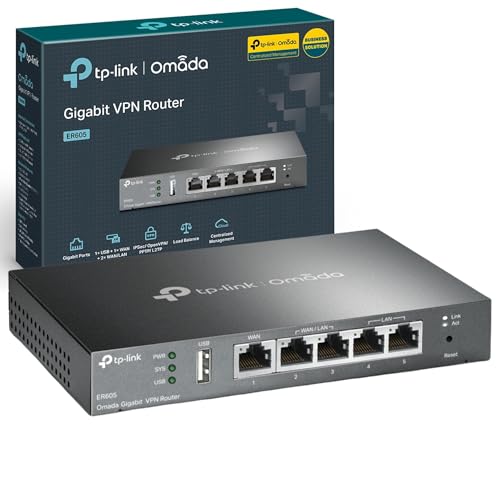
TP-Link SafeStream Gigabit VPN Router ER605
Available immediately
free shipping
  • high-speed wired connectivity through gigabit ports for efficient data transfer
  • compatible with dual-band networks for flexible connectivity options
  • integrated into mesh network systems for extended coverage and stability
Our rating
8,5
good

Similar Tp-Link Router comparisons

Tp-Link Routers buying guide: How to choose the right product from the above Tp-Link Routers test or comparison

Design and Functionality

When we think of a Wi-Fi router, specifically a Tp-Link router, we imagine a sleek device that fits seamlessly into our home. Tp-Link routers are known for their user-friendly design and reliable performance. They often come equipped with features like multiple antennas for better coverage and advanced technologies that help ensure a stable connection throughout your home.

Versatile Range of Options

One of the standout features of Tp-Link routers is the variety they offer. Whether you are a casual internet user or someone who enjoys online gaming and streaming, there is a Tp-Link router that meets your needs. From basic models that provide reliable connectivity to advanced models that support high-speed connections and numerous devices, the choices cater to different lifestyles and budgets.

Affordable Pricing Without Compromise

While high-end routers can come with an intimidating price tag, Tp-Link has positioned itself as a brand that offers affordability without sacrificing quality. This means we can find a solid router that fits our budget, making it accessible for most households.

Assessing Your Internet Needs

Before diving into the options, we need to consider how we use the internet at home. If we mainly browse web pages, a basic model might suffice. However, if our household consists of gamers and streamers, opting for a more high-performance router could make a significant difference in our internet experience.

Understanding Specifications

It’s essential to look at the specifications of the routers that catch your eye. Higher numbers in the range of Mbps indicate faster speed capabilities, and features like dual-band support can provide better connectivity with less interference. This way, we can ensure a smooth experience, even with multiple devices connected.

User Comments and Feedback

Reading reviews and user comments can be incredibly useful when choosing a Tp-Link router. Insights from other users help us understand performance, usability, and any quirks that specific models might have. This personal experience can guide our decision, ensuring we choose a router that aligns with our expectations.

Unboxing and Preparing

Once we have our Tp-Link router in hand, the first step is to carefully unbox the device. We will find the router, power adapter, ethernet cable, and a quick-start guide inside. It’s a good idea to keep the information handy during setup, as it offers valuable guidance.

Connecting to the Internet

We start by connecting the router to our modem using the provided ethernet cable. This typically involves plugging one end into the WAN port on the router and the other into the modem. Once connected, we plug in the power adapter and switch on the router, allowing a few moments for it to boot up.

Accessing the Router’s Settings

Next, we need to connect our computer or smartphone to the router’s network. By joining the Wi-Fi network using the default credentials listed on the back of the router, we can access the settings page by inputting the IP address into a web browser. This page allows us to configure important settings.

Finalising Setup

Once in the settings menu, we can customise the Wi-Fi name and password to something memorable. Save any changes before logging out of the settings page. This simple process sets us up for a reliable internet connection that we can start using immediately.

Choosing the Right Location

To maximise the performance of our Tp-Link router, placement is crucial. Ideally, it should be situated in a central location in our home, elevated from the ground and away from obstructions like walls. This ensures the signal reaches every corner of our space effectively.

Utilising the Right Frequency Band

If we have a dual-band router, we can switch between the 2.4GHz and 5GHz bands. Using 2.4GHz for wider coverage and 5GHz for faster speeds can enhance our internet experience. This means we can enjoy seamless streaming or gaming where it matters the most.

Regular Firmware Updates

Keeping the router’s firmware up to date is vital for optimal performance and security. We can easily check for updates through the router’s settings menu and install them when available. This step helps us ensure we are taking advantage of any improvements and keeping our network secure.


Table of contents
  1. Introduction to Tp-Link Routers: What Makes Them Stand Out
  2. Choosing the Right Tp-Link Router for Your Home: A Simple Guide
  3. Setting Up Your Tp-Link Router: Step-by-Step Instructions for Beginners
  4. Optimising Your Tp-Link Router: Tips for Better Speed and Connectivity

Overview

1. Comparison winner
TP-Link Archer MR600 Gigabit Router
Our rating
9,6
very good
TP-Link Archer MR600 Gigabit RouterAvailable immediately
2. Best value
TP-Link Archer AX23 Wi-Fi 6 Router
Our rating
9,6
very good
TP-Link Archer AX23 Wi-Fi 6 RouterAvailable immediately
TP-Link Archer NX210 Wi-Fi 6 5G Router
Our rating
9,6
very good
TP-Link Archer NX210 Wi-Fi 6 5G RouterAvailable immediately
4. Bestseller
TP-Link Archer MR500 AC1200 4G+ Router
Our rating
9,6
very good
TP-Link Archer MR500 AC1200 4G+ RouterAvailable immediately
TP-Link Deco X50-5G AX3000 Whole Home Wi-Fi 6 Router
Our rating
9,5
very good
TP-Link Deco X50-5G AX3000 Whole Home Wi-Fi 6 RouterAvailable immediately
TP-Link Archer AX1800 WiFi 6 Router
Our rating
9,4
good
TP-Link Archer AX1800 WiFi 6 RouterAvailable immediately
TP-Link Deco X10 WiFi 6 Mesh Router System
Our rating
9,4
good
TP-Link Deco X10 WiFi 6 Mesh Router SystemAvailable immediately
TP-Link Archer C6 WiFi Router
Our rating
9,3
good
TP-Link Archer C6 WiFi RouterAvailable immediately
Our product comparisons are:
Always up to date:
At most every 120 days, we update each category with new products and research developments in the top rankings. This ensures that our recommendations are always up to date
Neutral and independent:
Our tests and comparisons are objective and fact-based. Manufacturers have no influence on the ratings. We aim to provide greater transparency in the market, thereby promoting product quality.
Method-driven
In our tests & comparison tables, we only include products that meet our minimum standards. This ensures that you can find the perfect product for your needs from a wide selection.
Similar tests and comparisons - Internet Connectivity Products