Updated:29 October 2026
Rank 1-15 of the best USB Hubs
Our recommendation Price Customer rating
1. Comparison winner
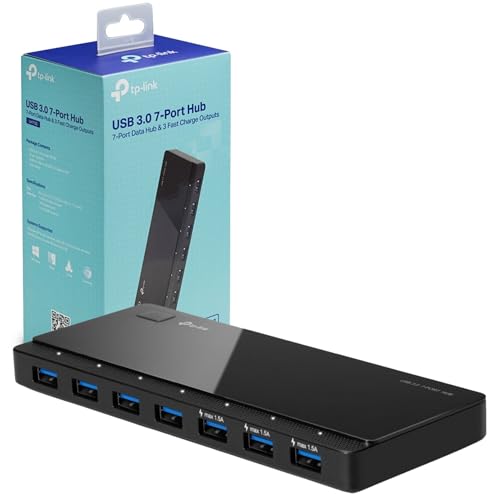
TP-Link UH700 7-Port USB Hub
Available immediately
free shipping
  • transfer speeds up to 5Gbps for quick data transmission
  • 7 USB 3.0 ports for connecting multiple devices
  • compatible with Windows, Mac OS X, and Linux, backwards-compatible with USB 2.0
Our rating
9,8
very good
400+ purchases last month
2. Best value
UGREEN 6-in-1 USB-C Hub with HDMI and Ethernet
Available immediately
free shipping
  • data transfer speed of up to 5 Gbps via three USB-A ports
  • includes six ports, featuring a 4K HDMI port, 1000Mbps Ethernet port, and three 5Gbps USB-A ports
  • compatible with USB-C devices including MacBook Pro, iMac, Chromebook, and more
Our rating
9,6
very good
3. Bestseller
RSHTECH RSH-518 7-Port Powered USB 3.0 Hub
Available immediately
free shipping
  • data transfer speed of up to 5Gbps
  • includes 7 USB 3.0 ports
  • compatible with computers, laptops, PS4, Xbox, Windows, Mac OS, Linux
Our rating
9,6
very good
400+ purchases last month
atolla 7-Port USB 3.0 Hub with Individual Power Switches
Available immediately
free shipping
  • data transfer speed of up to 5Gbps allows quick transmission of large files
  • features seven USB 3.0 ports for multiple device connectivity
  • compatible with Windows, Mac OS, and Linux operating systems
Our rating
9,5
very good
50+ purchases last month
RSHTECH 10-Port USB 3.0 Hub RSH-A10
Available immediately
free shipping
  • data transfer speed up to 5Gbps
  • 10 USB 3.0 ports
  • compatible with Windows, Mac OS and Linux
Our rating
9,5
very good
PHIXERO 7-Port USB 3.0 Hub
Available immediately
free shipping
  • provides a data transfer speed of up to 5 Gbps
  • features 7 USB ports
  • compatible with USB 2.0, 1.1 and OTG-supported devices
Our rating
9,5
very good
300+ purchases last month
atolla 7-Port USB 3.0 Hub
Available immediately
free shipping
  • data transfer speed up to 5Gbps
  • 7 USB 3.0 ports
  • compatible with Windows, Mac OS, Linux 2.1.6 and above
Our rating
9,4
good
UGREEN 5-in-1 USB-C Hub with 4K HDMI, 100W Power Delivery and 3 USB-A Ports
Available immediately
free shipping
  • data transfer speed: up to 5 gbps via usb-a 3.0 port
  • number of ports: one usb-c pd port, one hdmi port, one usb-a 3.0 port, two usb-a 2.0 ports
  • compatibility: supports most usb-c devices including laptops, tablets, and smartphones
Our rating
9,4
good
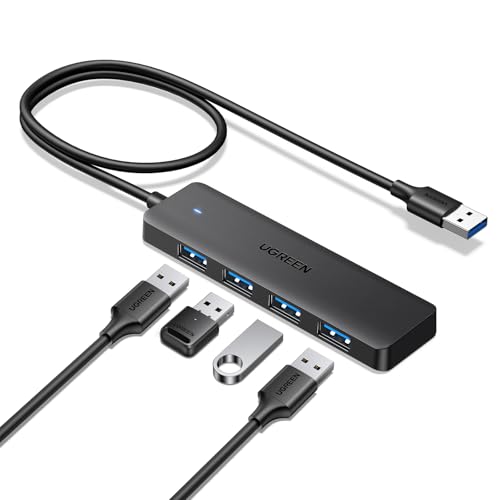
UGREEN 4-Port USB 3.0 Hub with 60 cm Cable
Available immediately
free shipping
  • maximum file transfer speed of 5Gbps
  • four USB A ports for connecting devices such as mice, keyboards and flash drives
  • compatible with Windows, macOS, Linux, Chrome OS, and more, including consoles and car systems
Our rating
9,4
good
UGREEN 4-Port USB 3.0 Hub
Available immediately
free shipping
  • file transfer speed of up to 5Gbps for fast data exchange
  • four USB A ports
  • compatible with Windows, macOS, Linux, Chrome OS, Xbox Series, PS5, and car systems
Our rating
9,3
good
Acer 4-Port USB 3.0 Hub with USB-C Power
Available immediately
free shipping
  • data transfer speed up to 5Gbps for fast file transfers
  • 4 USB 3.0 ports for connecting multiple devices simultaneously
  • compatible with Windows, macOS, Linux, Chrome OS and more
Our rating
9,3
good
SABRENT 4-Port USB Hub (HB-UM43)
Available immediately
free shipping
  • data transfer speed of up to 5Gbps for quick file transfer
  • four USB ports available
  • compatible with various devices such as USB sticks, external hard drives, and others
Our rating
9,1
good
300+ purchases last month
Anker 4-in-1 USB-A Hub, 5Gbps, 0.6 m
Available immediately
free shipping
  • data transfer speeds up to 5Gbps
  • four USB ports
  • compatible with desktop or laptop setups
Our rating
9,1
good
500+ purchases last month
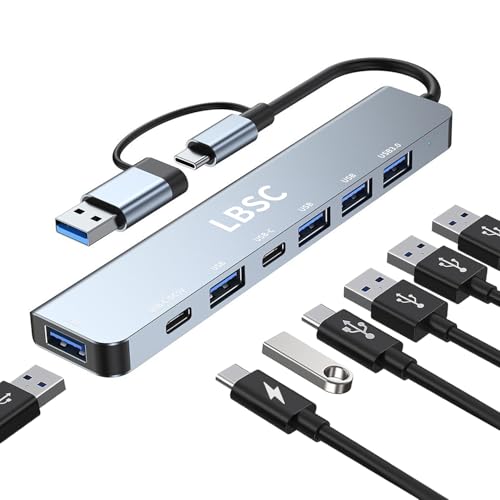
LBSC 7-in-1 USB-C Multiport Adaptor
Available immediately
free shipping
  • enhances data transfer stability with 1 USB 3.0 port and 4 USB 2.0 ports
  • includes 2 USB-C ports, note these only support power supply to the hub itself
  • compatible with devices like laptops, PCs, gaming consoles, storage drives, and peripherals
Our rating
9,0
good
BOULTON 4-Port USB 3.0 Hub
Available immediately
free shipping
  • 5 Gbps data transfer speed, allowing for quick transfer of HD movies. Compatible with USB 2.0 and USB 1.1 speeds (480 Mbps and 12 Mbps respectively)
  • Connect up to four USB devices simultaneously
  • Compatible with Windows, macOS, Linux, Android and more
Our rating
8,8
good

Similar USB Hub comparisons

USB Hubs buying guide: How to choose the right product from the above USB Hubs test or comparison

Understanding the Basics of USB Hubs: What They Are and How They Work

What is a USB Hub?

A USB hub is a device that expands a single USB port into several, allowing you to connect multiple USB devices simultaneously. Imagine your computer’s USB connectivity like a busy train station: the main line is your computer’s USB port, and the hub is like adding several tracks where different trains, or devices, can connect and operate without clogging up the main line.

How Do USB Hubs Function?

USB hubs work by acting as a bridge between your computer and multiple devices. When you plug a USB hub into your computer, it gets power from that single port and then distributes it to the devices you connect to the hub. Each port on the hub can be used for different devices, such as keyboards, mice, external drives, and printers, streamlining your workspace by reducing clutter.

Choosing the Right USB Hub for Your Needs: Port Types and Speed Considerations

Understanding Port Types

USB hubs come with various port types, including USB-A, USB-C, and even older versions like USB-B. If you primarily use modern devices, look for a hub that includes USB-C ports, as many laptops and devices have transitioned to this standard. However, if you still use older peripherals, ensure the hub has USB-A ports as well.

Considering Data Transfer Speeds

Data transfer speed is crucial depending on what you will connect to the hub. USB 2.0 hubs offer speeds up to 480 Mbps, which is sufficient for basic devices like mice or keyboards. However, for external hard drives or high-resolution webcams, we recommend choosing a USB 3.0 or 3.1 hub, which can reach speeds of up to 5 Gbps or 10 Gbps, respectively. This means you can transfer large files much more quickly, making your work more efficient.

Top Features to Look For in a USB Hub: Power Delivery, Design, and Expandability

Power Delivery (PD) Support

For those who use laptops or other devices that require charging, look for hubs that support Power Delivery. This feature allows the hub to provide power to your devices while also enabling data transfer, so you can charge your laptop without needing to plug it into a wall outlet separately. This is especially convenient for on-the-go professionals looking to streamline their workspace.

Design and Port Layout

The design of a USB hub can impact its functionality. Choose a hub with a sturdy build and a design that allows for adequate airflow, preventing devices from overheating. Also, consider the layout of the ports – a hub with well-spaced ports can accommodate larger USB devices without blocking neighbouring connections.

Expandability Options

If you foresee needing more ports in the future, opt for a hub that allows for expandability. Some hubs come with additional connections like SD card readers or Ethernet ports, which could enhance your setup without cluttering your workspace further. This flexibility makes your hub more valuable in the long run.

Best for Everyday Use: The Versatile Hub

For general use, we recommend a compact USB hub with four to seven ports, including both USB-A and USB-C connections. Such a hub fits perfectly on a desk and is ideal for anyone who regularly connects multiple devices, from printers to external drives, enhancing productivity without taking up too much space.

Best for Travel: A Portable Option

When on the move, a lightweight, slim USB hub is essential. Look for models that easily fit in a laptop bag and offer at least two USB-A ports and one USB-C port. This will keep you connected no matter where you are, working effectively without the bulk.

Best for Gaming: High-Speed Performance

Gamers should choose a USB hub that supports fast data transfer speeds, such as a USB 3.1 hub. Opt for a model that includes ports for gaming peripherals like headsets, controllers, and external storage, ensuring minimal lag time and a seamless gaming experience.

Maximising Your Use of USB Hubs: Tips for Setup and Connectivity

Optimal Placement of Your USB Hub

To maximise its efficiency, place your USB hub in an accessible location where you can easily reach it. This will ensure you can quickly plug in devices as needed. Consider connecting the hub to the back of your computer to keep cables tidy while allowing front access for frequently used devices.

Utilising Hub Features to Enhance Productivity

Take advantage of any built-in features your USB hub may offer. If your hub includes individual on/off switches for each port, use them to manage power to connected devices efficiently. This can help to save energy and prevent wear on devices you don’t use regularly.

Keeping Your Hub Updated

Lastly, ensure your USB hub’s firmware is up-to-date if available. This can improve performance and compatibility with new devices or technologies. Regular updates help maintain a seamless connection with your peripherals, allowing for a smoother workflow.


Table of contents
  1. Understanding the Basics of USB Hubs: What They Are and How They Work
  2. Choosing the Right USB Hub for Your Needs: Port Types and Speed Considerations
  3. Top Features to Look For in a USB Hub: Power Delivery, Design, and Expandability
  4. Our Top Picks for USB Hubs: Recommended Models for Every Scenario
  5. Maximising Your Use of USB Hubs: Tips for Setup and Connectivity

Overview

1. Comparison winner
TP-Link UH700 7-Port USB Hub
Our rating
9,8
very good
TP-Link UH700 7-Port USB HubAvailable immediately
2. Best value
UGREEN 6-in-1 USB-C Hub with HDMI and Ethernet
Our rating
9,6
very good
UGREEN 6-in-1 USB-C Hub with HDMI and EthernetAvailable immediately
3. Bestseller
RSHTECH RSH-518 7-Port Powered USB 3.0 Hub
Our rating
9,6
very good
RSHTECH RSH-518 7-Port Powered USB 3.0 HubAvailable immediately
atolla 7-Port USB 3.0 Hub with Individual Power Switches
Our rating
9,5
very good
atolla 7-Port USB 3.0 Hub with Individual Power SwitchesAvailable immediately
RSHTECH 10-Port USB 3.0 Hub RSH-A10
Our rating
9,5
very good
RSHTECH 10-Port USB 3.0 Hub RSH-A10Available immediately
PHIXERO 7-Port USB 3.0 Hub
Our rating
9,5
very good
PHIXERO 7-Port USB 3.0 HubAvailable immediately
atolla 7-Port USB 3.0 Hub
Our rating
9,4
good
atolla 7-Port USB 3.0 HubAvailable immediately
UGREEN 5-in-1 USB-C Hub with 4K HDMI, 100W Power Delivery and 3 USB-A Ports
Our rating
9,4
good
UGREEN 5-in-1 USB-C Hub with 4K HDMI, 100W Power Delivery and 3 USB-A PortsAvailable immediately
Our product comparisons are:
Always up to date:
At most every 120 days, we update each category with new products and research developments in the top rankings. This ensures that our recommendations are always up to date
Neutral and independent:
Our tests and comparisons are objective and fact-based. Manufacturers have no influence on the ratings. We aim to provide greater transparency in the market, thereby promoting product quality.
Method-driven
In our tests & comparison tables, we only include products that meet our minimum standards. This ensures that you can find the perfect product for your needs from a wide selection.
Similar tests and comparisons - Digital Device Accessories