Updated:18 October 2026
Rank 1-13 of the best Wi-Fi Cards
Our recommendation Price Customer rating
1. Comparison winner
TP-Link Archer TX55E PCIe Adapter
Available immediately
free shipping
  • Wi-Fi speed: up to 2402 Mbps on 5 GHz and 574 Mbps on 2.4 GHz
  • Bluetooth version: 5.2
  • compatibility: supports Windows 11 and 10 (64-bit)
Our rating
9,9
very good
500+ purchases last month
2. Best value
Asus AXE5400 Wi-Fi 6E PCI Express Adapter
Available immediately
free shipping
  • supports high-speed Wi-Fi 6 connectivity
  • integrated Bluetooth 5.2 for wireless device compatibility
  • compatible with multiple operating systems
Our rating
9,8
very good
MERCUSYS MA30E AC1200 PCIe WiFi Card
Available immediately
free shipping
  • dual band Wi-Fi speed up to 867 Mbps on 5 GHz and 300 Mbps on 2.4 GHz
  • Bluetooth version 5.0 for faster speeds and broader coverage
  • compatibility with Windows 10 and 11, 64-bit systems
Our rating
9,8
very good
100+ purchases last month
Intel AX210 NGW WiFi 6E Wireless Card Bluetooth 5.3 Tri-Band
Available immediately
free shipping
  • wi-fi speed of up to 5374 Mbps with tri-band coverage on 6 GHz, 5 GHz, and 2.4 GHz
  • bluetooth version 5.3 for lower latency and improved battery life
  • compatible with Windows 10 and 11 64-bit
Our rating
9,6
very good
5. Bestseller
TP-LINK AX3000 Wi-Fi 6 PCIe Adapter (Archer TX3000E)
Available immediately
free shipping
  • Wi-Fi speeds up to 2402 Mbps (5 GHz) and 574 Mbps (2.4 GHz)
  • Bluetooth version 5.2
  • compatible with various operating systems
Our rating
9,6
very good
200+ purchases last month
Intel WiFi 6E AX210 PCIe Card
Available immediately
free shipping
  • maximum Wi-Fi speed of up to 5400 Mbps with support for different GHz bands
  • Bluetooth 5.2 version with improved speed and coverage
  • compatible with Windows 10 and 11 operating systems
Our rating
9,6
very good
TP-Link AC1200 PCI Express Adapter Archer T4E
Available immediately
free shipping
  • up to 1200 Mbps Wi-Fi speeds with 867 Mbps on 5 GHz and 300 Mbps on 2.4 GHz
Our rating
9,5
very good
50+ purchases last month
SYONCON AXE5400 PCIe WiFi Card with Bluetooth 5.3
Available immediately
free shipping
  • up to 2400 Mbps on 6 GHz, 2400 Mbps on 5 GHz, and 574 Mbps on 2.4 GHz
  • bluetooth version 5.3 for extended range and faster transmission
  • compatible with Windows 10/11 64-bit and Linux systems
Our rating
9,4
good
Intel WiFi 6E AX210 PCIe Network Card with Bluetooth 5.3
Available immediately
free shipping
  • Wi-Fi speed: up to 2402 Mbps on both 5GHz and 6GHz bands, 574 Mbps on 2.4GHz
  • Bluetooth version: 5.3 for faster speeds and wider coverage
  • compatible with Windows 11 and Windows 10 (64 bit) desktop computers
Our rating
9,3
good
WiFi 6E AX210 NGW Card with Bluetooth 5.3, Tri-Band for Windows 10/11
Available immediately
free shipping
  • Wi-Fi speeds up to 2400 Mbps on 6 GHz, 2400 Mbps on 5 GHz, and 574 Mbps on 2.4 GHz
  • Bluetooth version 5.3 offers twice the transmission speed and four times the range compared to 4.2
  • Compatible with Windows 10/11 64-bit and Linux systems
Our rating
9,0
good
200+ purchases last month
GLOTRENDS Wi-Fi 5 AC1200 PCIe WiFi Card
Available immediately
free shipping
  • dual band 2.4GHz and 5GHz frequencies
  • Wi-Fi speed of 300Mbps on 2.4GHz and 867Mbps on 5GHz
  • compatible with Windows 11,10, 8.1, 8, 7 (32 and 64-bit) and Linux 4.2+
Our rating
8,6
good
PCIe Wi-Fi Card AC 1200Mbps with Bluetooth 4.2
Available immediately
free shipping
  • dual band Wi-Fi speed up to 867 Mbps on 5 GHz and 300 Mbps on 2.4 GHz
  • Bluetooth version 4.2 for faster speeds and broader coverage
  • compatible with Windows 7, 8, 10, and 11
Our rating
8,5
good
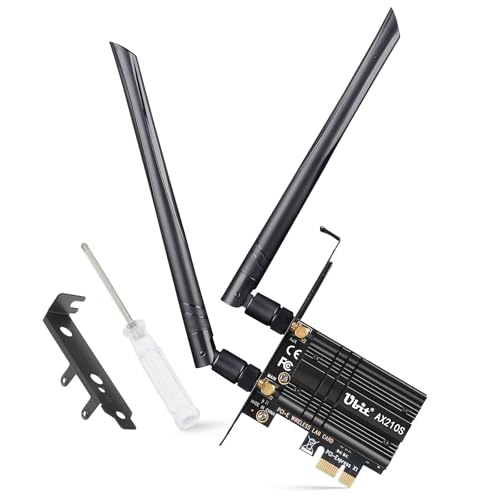
Ubit AC1200 Dual Band PCIe WiFi Card with Bluetooth 4.2 (WIE7265)
Available immediately
free shipping
  • 1200Mbps Wi-Fi speeds with 867Mbps on 5GHz and 300Mbps on 2.4GHz
  • Bluetooth 4.2 for wireless connectivity with most devices
  • Compatible with Windows 10, Windows 8.1, Windows 8, Windows 7, and Windows Server
Our rating
8,5
good

Similar Wi-Fi Card comparisons

Wi-Fi Cards buying guide: How to choose the right product from the above Wi-Fi Cards test or comparison

Understanding Wi-Fi Cards: What You Need to Know

What is a Wi-Fi Card?

A Wi-Fi card is a hardware component that enables your computer or laptop to connect to wireless networks. Think of it as a translator between your device and the internet. Without a Wi-Fi card, your device would be unable to pick up the signals from your wireless router, meaning no internet access. There are various types of Wi-Fi cards; some are built into the device, while others can be added later.

The Importance of Wi-Fi Cards

In our interconnected world, having a reliable internet connection is essential. Wi-Fi cards play a crucial role in this, as they determine the speed, range, and stability of your wireless connection. A good Wi-Fi card can make the difference between seamless streaming and frustrating buffering. By understanding the role of Wi-Fi cards, we can select the best options to enhance our connectivity.

Choosing the Right Wi-Fi Card for Your Needs

Consider Your Device Compatibility

Before purchasing a Wi-Fi card, we must ensure compatibility with our device. Most laptops come with built-in Wi-Fi cards, but if you’re building a desktop or upgrading an existing laptop, check the specifications. Many cards use PCIe slots; thus, we should verify that our motherboard supports this type before making a decision.

Assess Your Internet Usage

Our internet usage should guide our choice of Wi-Fi card. If we primarily browse the web and stream videos, a mid-range card is often sufficient. However, for activities like online gaming or 4K streaming, investing in a high-performance card could be beneficial to avoid lag and buffering.

Budget Considerations

Setting a budget is a crucial part of selecting a Wi-Fi card. Cards can vary significantly in price based on their features and performance. We should identify our budget range before comparing options to ensure we find a card that meets our needs without overspending.

Installation Made Easy: A Step-by-Step Guide

Gathering Tools and Materials

To install a Wi-Fi card, we typically need a few tools: a screwdriver, an anti-static wrist strap, and possibly thermal paste, depending on the model. Additionally, having a clean workspace helps prevent dust from entering our devices during the process.

Steps to Install Your Wi-Fi Card

First, we need to power down our computer and unplug it from any outlets. After opening the case, we locate the empty PCIe slot. Carefully insert the Wi-Fi card into the slot, ensuring it is firmly seated. Next, we secure it in place with a screw. Finally, we close the case, reconnect power, and install the necessary drivers for the card.

Features to Look for in a Wi-Fi Card

Speed Ratings Explained

When shopping for a Wi-Fi card, we should pay attention to speed ratings, which are often expressed as Mbps (megabits per second). For example, a card rated at 1300 Mbps can theoretically handle faster connections, making it suitable for high-bandwidth activities. We must ensure it matches or exceeds our internet speed for optimal performance.

Dual-Band Capabilities

We highly recommend selecting a dual-band Wi-Fi card. This feature allows connectivity to both 2.4 GHz and 5 GHz networks, providing flexibility. The 2.4 GHz band offers wider coverage, while the 5 GHz band typically provides faster speeds over shorter distances. Having both options maximizes our ability to connect to the best available signal.

Antenna Design and Range

The antenna design also affects signal strength and range. A card with external antennas generally provides better performance than those with internal antennas. When possible, we should opt for models featuring adjustable or detachable antennas to improve our connection strength.

Maximising Your Wi-Fi Card’s Performance

Optimal Placement and Environment

The position of our router can dramatically impact Wi-Fi performance. Ideally, we should place the router at a height and in a central location within our home. Minimising obstacles like walls and electronic devices can also enhance signal strength, allowing us to get the most out of our Wi-Fi card.

Updating Drivers Regularly

Keeping our Wi-Fi card drivers updated is vital for optimal performance. Manufacturers frequently release updates that can boost speed, improve security, and fix bugs. We should schedule regular checks for updates to ensure our card is running smoothly.

Utilising Quality Modems and Routers

Finally, ensuring we have a high-quality modem and router paired with our Wi-Fi card can further enhance connectivity. Outdated or lower-quality devices can bottleneck performance, so investing in good home networking equipment is essential for achieving the best possible speeds.


Table of contents
  1. Understanding Wi-Fi Cards: What You Need to Know
  2. Choosing the Right Wi-Fi Card for Your Needs
  3. Installation Made Easy: A Step-by-Step Guide
  4. Features to Look for in a Wi-Fi Card
  5. Maximising Your Wi-Fi Card’s Performance

Overview

1. Comparison winner
TP-Link Archer TX55E PCIe Adapter
Our rating
9,9
very good
TP-Link Archer TX55E PCIe AdapterAvailable immediately
2. Best value
Asus AXE5400 Wi-Fi 6E PCI Express Adapter
Our rating
9,8
very good
Asus AXE5400 Wi-Fi 6E PCI Express AdapterAvailable immediately
MERCUSYS MA30E AC1200 PCIe WiFi Card
Our rating
9,8
very good
MERCUSYS MA30E AC1200 PCIe WiFi CardAvailable immediately
Intel AX210 NGW WiFi 6E Wireless Card Bluetooth 5.3 Tri-Band
Our rating
9,6
very good
Intel AX210 NGW WiFi 6E Wireless Card Bluetooth 5.3 Tri-BandAvailable immediately
5. Bestseller
TP-LINK AX3000 Wi-Fi 6 PCIe Adapter (Archer TX3000E)
Our rating
9,6
very good
TP-LINK AX3000 Wi-Fi 6 PCIe Adapter (Archer TX3000E)Available immediately
Intel WiFi 6E AX210 PCIe Card
Our rating
9,6
very good
Intel WiFi 6E AX210 PCIe CardAvailable immediately
TP-Link AC1200 PCI Express Adapter Archer T4E
Our rating
9,5
very good
TP-Link AC1200 PCI Express Adapter Archer T4EAvailable immediately
SYONCON AXE5400 PCIe WiFi Card with Bluetooth 5.3
Our rating
9,4
good
SYONCON AXE5400 PCIe WiFi Card with Bluetooth 5.3Available immediately
Our product comparisons are:
Always up to date:
At most every 120 days, we update each category with new products and research developments in the top rankings. This ensures that our recommendations are always up to date
Neutral and independent:
Our tests and comparisons are objective and fact-based. Manufacturers have no influence on the ratings. We aim to provide greater transparency in the market, thereby promoting product quality.
Method-driven
In our tests & comparison tables, we only include products that meet our minimum standards. This ensures that you can find the perfect product for your needs from a wide selection.
Similar tests and comparisons - PC Hardware