Updated:22 October 2026
Rank 1-15 of the best Wlan Bluetooth Cards
Our recommendation Price Customer rating
1. Comparison winner
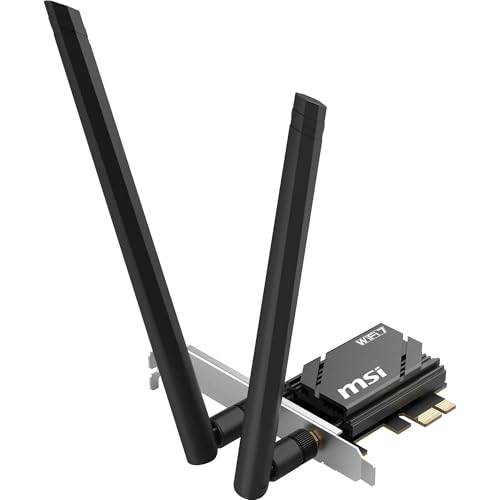
MSI HERALD WiFi 7 PCIe Card BE6500, Tri-band, 6 GHz, Bluetooth 5.4, MLO, WPA3 Security
Available immediately
free shipping
  • Wi‑Fi speed per band up to 2882 Mbps on 6 GHz, up to 2882 Mbps on 5 GHz and up to 688 Mbps on 2.4 GHz
  • latency remains ultra‑low for responsive gaming and smooth streaming
  • signal coverage is extended by high‑gain antennas to reach a larger area
Our rating
9,9
very good
100+ purchases last month
2. Bestseller
TP-LINK AX3000 Wi-Fi 6 PCIe Adapter (Archer TX3000E)
Available immediately
free shipping
  • up to 2402 Mbps on 5 GHz and 574 Mbps on 2.4 GHz for fast internet connection
  • 75% lower latency for ultra-responsive real-time gaming
  • multi-directional antennas with magnetised base for optimal signal reception
Our rating
9,8
very good
200+ purchases last month
3. Best value
MERCUSYS MA30E AC1200 PCIe WiFi Card
Available immediately
free shipping
  • Wi-Fi speed up to 867 Mbps on 5 GHz and 300 Mbps on 2.4 GHz
  • Latency is reduced with MU-MIMO allowing for multiple devices simultaneously
  • Signal coverage is extended with two high-performance antennas
Our rating
9,8
very good
100+ purchases last month
ViewSonic VSB050 WLAN/Bluetooth Network Card
Available immediately
free shipping
  • provides fast Wi-Fi speeds for efficient internet connectivity
  • offers low latency for quick data transmission
  • provides broad signal coverage for connectivity in larger spaces
Our rating
9,8
very good
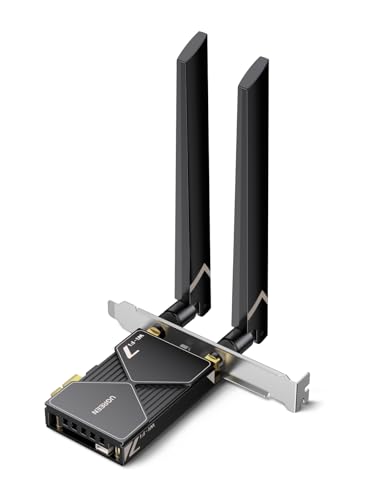
UGREEN BE6500 PCIe WiFi 7 Card with Bluetooth 5.4 and 6 GHz band
Available immediately
free shipping
  • wifi speed up to 2882 Mbps using 160 MHz bandwidth on the 6 GHz band
  • latency improved by multi-link operation for a more stable and responsive gaming experience
  • signal coverage enhanced by a flexible 6 dBi high-gain antenna with adjustable orientation for stronger signal and longer range
Our rating
9,8
very good
50+ purchases last month
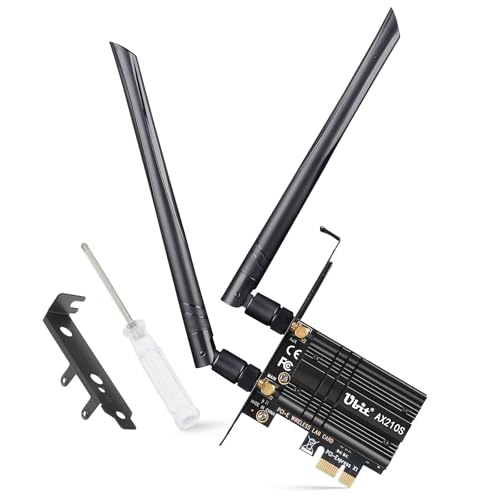
Intel WiFi 6E AX210 PCIe Card
Available immediately
free shipping
  • Wi‑Fi speed: up to 5.4 gigabits per second across 6 GHz and 5 GHz bands
  • Latency: reduces lag for real-time gaming and immersive VR experiences thanks to OFDMA and MU-MIMO
  • bluetooth version: bluetooth 5.3 enables faster data transfer and wider device coverage
Our rating
9,6
very good
Intel Wireless-AC 9560 WiFi Card
Available immediately
free shipping
  • data transfer rate up to 1.73 Gbps
  • signal coverage supports 802.11AC WLAN
  • bluetooth version 5.1
Our rating
9,6
very good
Intel WiFi 6E AX210 PCIe Network Card with Bluetooth 5.3
Available immediately
free shipping
  • Wi-Fi 6E offers high-speed internet up to 2402 Mbps on 6GHz and 5GHz bands and 574 Mbps on 2.4GHz band
  • Reduced latency with optimised signal coverage using two 6dBi antennas
  • Bluetooth 5.3 means faster connectivity and wider range for devices such as controllers and keyboards
Our rating
9,6
very good
Intel Dual Band Wireless-AC 7265+BT Network Card
Available immediately
free shipping
  • wi-fi speed up to 867 Mbps
  • bluetooth version 4.0
Our rating
9,5
very good
WiFi 6E AX210 NGW Card with Bluetooth 5.3, Tri-Band for Windows 10/11
Available immediately
free shipping
  • 6 GHz capable wifi card using 802.11ax with 80 MHz and 160 MHz channel support delivering up to 2400 Mbps on 6 GHz, up to 2400 Mbps on 5 GHz and up to 574 Mbps on 2.4 GHz
  • OFDMA and MU-MIMO enable better sharing of network traffic, resulting in lower latency and faster downloads even with many devices connected
  • improved signal reach and stability when multiple devices are connected, helping to avoid congestion in busy networks
Our rating
9,5
very good
200+ purchases last month
Dual Band Mini PCI-E WiFi & Bluetooth Card
Available immediately
free shipping
  • dual-band wireless network supports both 2.4 GHz and 5 GHz frequencies with a maximum rate of 300 Mbps
  • signal coverage ensures smooth and efficient data transmission due to compact design
  • bluetooth allows for high-speed signal transmission when connected
Our rating
9,1
good
M.2 NGFF Wireless Network Card (2.4 GHz/5 GHz, 1200 Mbps) with Bluetooth, for Qualcomm QCNFA344A
Available immediately
free shipping
  • Wi-Fi Geschwindigkeit: up to 1200 Mbps wireless speed (802.11ac, 5 GHz 867 Mbps and 2.4 GHz 300 Mbps) via NGFF M2 interface for easy installation
Our rating
9,0
good
Atheros AR9462 Mini PCI-E WiFi Card
Available immediately
free shipping
  • maximum Wi-Fi speed for fast internet usage
  • low latency for seamless online activities
  • extensive signal coverage for larger areas
Our rating
8,9
good
ASHATA Intel 9461NGW WiFi Network Card
Available immediately
free shipping
  • wi-fi speed up to 433mbps
  • latency
  • signal coverage
Our rating
8,8
good
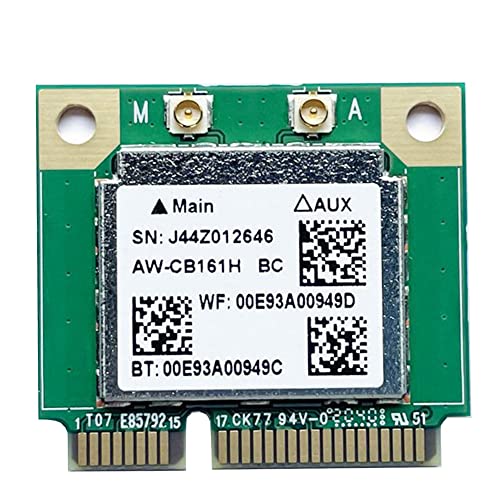
XIAOJUN Dual-Band Realtek RTL8821AW-CB161H Wi‑Fi + Bluetooth 4.0 PCIe Half-Height Card, 433 Mbps, 802.11ac
Available immediately
free shipping
  • Wi-Fi speed up to 433 Mbps across 2.4 GHz and 5 GHz bands
  • Bluetooth version 4.0
Our rating
8,5
good
No reviews yet

Similar Wlan Bluetooth Card comparisons

Wlan Bluetooth Cards buying guide: How to choose the right product from the above Wlan Bluetooth Cards test or comparison

Understanding Wlan Bluetooth Cards: The Basics

What Are Wlan Bluetooth Cards?

Wlan Bluetooth cards are hardware components that enable laptops and desktops to connect wirelessly to the internet and communicate with other Bluetooth devices. Think of them as the essential link that lets your device join a network and allows it to connect to peripherals like wireless mice, keyboards, and headphones. They come in various forms, including internal cards that fit inside your computer and external adapters that plug into USB ports. Understanding the role of these cards is crucial if you want to harness the full potential of your device’s wireless capabilities.

Why Do You Need One?

We all rely on wireless connectivity for daily tasks, whether streaming videos, participating in video calls, or transferring files between devices. A reliable Wlan Bluetooth card ensures you can connect seamlessly to Wi-Fi and manage multiple Bluetooth devices without interruption. If your device lacks built-in support for these features, a good quality card can significantly enhance your user experience, making it possible to work and play without the hassle of wires.

Choosing the Right Wlan Bluetooth Card for Your Needs

Assessing Your Device Compatibility

Before making a purchase, we need to ensure that the card we choose is compatible with our device. This can often be done by checking the manufacturer’s specifications for our laptop or desktop. For internal cards, we should look for the type of slot available, such as PCIe or M.2. For external adapters, USB compatibility is key. By confirming compatibility, we can avoid potential installation headaches.

Understanding Speed and Range Requirements

Not all Wlan Bluetooth cards offer the same performance. We should consider both the Wi-Fi standards they support, such as Wi-Fi 5 (802.11ac) or Wi-Fi 6 (802.11ax), and their Bluetooth technology, like Bluetooth 4.2 or 5.0. Higher speeds and longer ranges will generally provide a better experience, particularly if we frequently use our internet connection for high-bandwidth activities like gaming or streaming high-definition videos.

Key Features to Look for in Wlan Bluetooth Cards

Dual-Band Support

Dual-band support is a critical feature that allows us to connect to both 2.4GHz and 5GHz frequency bands. The benefit of this is significant; the 2.4GHz band provides a broader coverage area, while the 5GHz band offers faster speeds with less interference. Having a card that supports both frequencies allows us the flexibility to choose the best connection for our needs.

Enhanced Security Features

Security is paramount when connecting to wireless networks. Look for Wlan Bluetooth cards that support the latest security protocols, such as WPA3. This means that our data is better safeguarded from potential threats and unauthorized access over wireless connections.

Installation and Setup: Making It Easy

Internal vs External Installation

Installing an internal Wlan Bluetooth card typically involves opening up our device and inserting the card into the appropriate slot. While this might seem daunting, many laptops and desktops are designed to make this straightforward, with guides readily available. For those less confident, opting for an external USB adapter is a hassle-free way to get connected, as it simply requires plugging into a USB port without any technical setup.

Software and Driver Installation

Once we have physically installed the card or plugged in the adapter, we need to ensure that we install the necessary drivers. Most modern cards come with installation guides that include links to driver downloads. This step is crucial to ensure that our operating system can recognise and effectively communicate with the hardware, allowing us to enjoy reliable wireless connectivity.

Enhancing Your Connectivity Experience

Utilising Software Tools

Many Wlan Bluetooth cards come with useful software tools that allow us to manage our connections effectively. These applications can help optimize our network settings, monitor signal strength, and provide a user-friendly interface to control connected Bluetooth devices. We can benefit from exploring these features to enhance our connectivity experience.

Understanding Signal Interference and Solutions

To achieve the best performance from our Wlan Bluetooth cards, we should be aware of potential signal interference from other devices. Common sources include microwaves, cordless phones, and even other Wi-Fi networks. Keeping our routers positioned away from these devices and ensuring that our Wi-Fi network is on the least congested channel can drastically improve our connection quality.


Table of contents
  1. Understanding Wlan Bluetooth Cards: The Basics
  2. Choosing the Right Wlan Bluetooth Card for Your Needs
  3. Key Features to Look for in Wlan Bluetooth Cards
  4. Installation and Setup: Making It Easy
  5. Enhancing Your Connectivity Experience

Overview

1. Comparison winner
MSI HERALD WiFi 7 PCIe Card BE6500, Tri-band, 6 GHz, Bluetooth 5.4, MLO, WPA3 Security
Our rating
9,9
very good
MSI HERALD WiFi 7 PCIe Card BE6500, Tri-band, 6 GHz, Bluetooth 5.4, MLO, WPA3 SecurityAvailable immediately
2. Bestseller
TP-LINK AX3000 Wi-Fi 6 PCIe Adapter (Archer TX3000E)
Our rating
9,8
very good
TP-LINK AX3000 Wi-Fi 6 PCIe Adapter (Archer TX3000E)Available immediately
3. Best value
MERCUSYS MA30E AC1200 PCIe WiFi Card
Our rating
9,8
very good
MERCUSYS MA30E AC1200 PCIe WiFi CardAvailable immediately
ViewSonic VSB050 WLAN/Bluetooth Network Card
Our rating
9,8
very good
ViewSonic VSB050 WLAN/Bluetooth Network CardAvailable immediately
UGREEN BE6500 PCIe WiFi 7 Card with Bluetooth 5.4 and 6 GHz band
Our rating
9,8
very good
UGREEN BE6500 PCIe WiFi 7 Card with Bluetooth 5.4 and 6 GHz bandAvailable immediately
Intel WiFi 6E AX210 PCIe Card
Our rating
9,6
very good
Intel WiFi 6E AX210 PCIe CardAvailable immediately
Intel Wireless-AC 9560 WiFi Card
Our rating
9,6
very good
Intel Wireless-AC 9560 WiFi CardAvailable immediately
Intel WiFi 6E AX210 PCIe Network Card with Bluetooth 5.3
Our rating
9,6
very good
Intel WiFi 6E AX210 PCIe Network Card with Bluetooth 5.3Available immediately
Our product comparisons are:
Always up to date:
At most every 120 days, we update each category with new products and research developments in the top rankings. This ensures that our recommendations are always up to date
Neutral and independent:
Our tests and comparisons are objective and fact-based. Manufacturers have no influence on the ratings. We aim to provide greater transparency in the market, thereby promoting product quality.
Method-driven
In our tests & comparison tables, we only include products that meet our minimum standards. This ensures that you can find the perfect product for your needs from a wide selection.
Similar tests and comparisons - PC Hardware