Updated:31 October 2026
Rank 1-17 of the best 4-Bay NAS
Our recommendation Price Customer rating
1. Comparison winner
Synology DiskStation DS925+ 4-Bay NAS with 2.5GbE, expandable to 9 bays, M.2 NVMe caching, backup, surveillance and collaboration
Coming soon
free shipping
  • storage capacity up to 180 TB with expansion to 9 bays using the DX525
  • dual 2.5 GbE ports for fast network speeds and improved redundancy
  • data protection features for backups and recovery
Our rating
9,8
very good
Synology DS925+ 4-Bay NAS with Expandable Capacity
Available immediately
free shipping
  • up to 180 TB of storage capacity with five additional drive bays via a DX525 expansion unit
  • two 2.5 GbE network ports for fast data transfers and enhanced redundancy
  • data protection and backup capabilities to safeguard stored files
Our rating
9,8
very good
UGREEN DXP480T Plus 4-Bay NVMe SSD NAS (Diskless)
Available immediately
free shipping
  • 12th generation Intel Core i5 processor with 10 cores and 12 threads for strong performance
  • storage capacity up to 32 terabytes using four M.2 NVMe slots for fast all‑flash storage
  • a 10 GbE network port offering up to 1250 MB/s throughput and built-in Wi-Fi 6 for wireless connectivity
Our rating
9,8
very good
4. Best value
UGREEN DXP4800 Pro 4-Bay NAS, Intel Core i3, 8GB RAM, Diskless
Available immediately
free shipping
  • Intel Core i3-1315U processor with 6 cores and 8 threads, up to 4.5 GHz turbo for smooth multitasking and virtualization
  • Storage capacity up to 144 terabytes (4x HDD and 2x M.2 SSD), with dual M.2 PCIe 4.0 slots for fast cache or a storage pool
  • Network connections include dual high speed ports: 10 GbE and 2.5 GbE for rapid data transfers up to 1.25 GB/s
Our rating
9,8
very good
100+ purchases last month
5. Bestseller
Asustor Lockerstor 4 Gen 2 AS6704T NAS
Available immediately
free shipping
  • quad-core Intel Celeron N5105 processor with enhanced performance
  • memory uses DDR4-2933 for improved speed
  • superfast 2.5-gigabit ethernet ports for fast connectivity
Our rating
9,8
very good
Synology DS423+ 4 Bay NAS Server
Available immediately
free shipping
  • up to 72 terabytes of storage for centralized data management and ownership
  • built-in support for data protection and file management tools
  • easy data sharing and syncing across various operating systems
Our rating
9,6
very good
Synology RS422+ 4 Bay NAS
Available immediately
free shipping
  • ECC memory prevents data corruption
  • built-in dual 1GbE ports with optional 10GbE expansion
  • provides data management and backup solutions
Our rating
9,6
very good
UGREEN NASync DXP4800 Plus 4-Bay NAS, Diskless
Available immediately
free shipping
  • supports up to 112TB storage capacity
  • features 10GbE network connectivity for fast data transfers
  • provides a variety of RAID options for data recovery
Our rating
9,6
very good
Asustor AS5404T Nimbustor 4 Gen2 4-Bay NAS (Diskless)
Available immediately
free shipping
  • quad-core Intel Celeron N5105 processor for efficient multitasking
  • four M.2 slots for NVMe SSDs providing ample storage space
  • two 2.5 Gigabit Ethernet ports for fast and reliable network connectivity
Our rating
9,6
very good
UGREEN NASync DXP4800 GT 4-Bay NAS (Diskless)
Available immediately
free shipping
  • processor: amd ryzen embedded r2514 with 4 cores and 8 threads, up to 3.7 ghz boost for efficient multitasking
  • storage capacity: up to 144 terabytes of total storage across four sata hard disk bays (including two u.2 nvme ready bays) and dual m.2 nvme ssd slots for ultra fast access, with smart tiered storage combining ssd speed and hdd capacity
  • network connections: two 10gbe network ports delivering up to 1250 mb/s and a full set of interfaces including sd card reader, usb-a/usb-c ports and 4k hdmi output
Our rating
9,6
very good
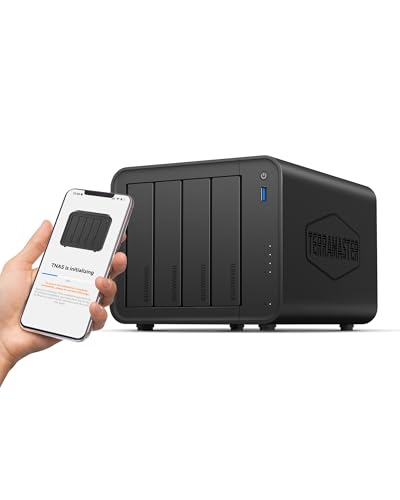
TerraMaster F4-425 4-Bay NAS, Diskless
Available immediately
free shipping
  • Intel x86 quad-core processor with 4GB of non-ECC RAM enables smooth multitasking and 4K video transcoding
  • Total storage capacity up to 120 TB across four drive bays (4 x 30 TB) for large data libraries
  • One 2.5 GbE network port delivers fast file transfers and supports multiple users accessing the NAS simultaneously
Our rating
9,3
good
Synology DS423 4-Bay NAS
Available immediately
free shipping
  • up to 72 TB of data storage capacity
  • multi-platform access for secure sharing and syncing
  • protect data with snapshots and multiple backup destinations
Our rating
9,3
good
UGREEN NASync DH4300 Plus 4-Bay Desktop NAS (Diskless)
Available immediately
free shipping
  • eight-core processor using Arm A76 and A55 cores
  • 128 terabytes of storage space for files, photos and videos with room for future growth
  • one 2.5 gigabits per second ethernet port for fast wired network connections
Our rating
9,1
good
QNAP TS-433-4G 4-Bay NAS
Available immediately
free shipping
  • ARM NEON technology processor for improved video processing and entertainment
Our rating
9,1
good
ASUSTOR Drivestor 4 Gen 2 AS1204T 4-Bay NAS, Diskless
Available immediately
free shipping
  • 1.7 GHz quad-core Realtek RTD1619B processor with 1 GB DDR4 RAM for efficient multitasking and data management
  • 4-bay storage system supporting up to 4 drives for scalable capacity
  • 2.5-Gigabit Ethernet for faster file transfers, improving backup and media streaming
Our rating
9,0
good
QNAP TR-004 4 Bay Desktop NAS
Available in a few days
free shipping
  • Supports up to four SATA drives for reliable read and write performance
  • USB 3.2 Gen 1 Type-C port for faster data transfer
  • Disk mode DIP switch for RAID group configuration
Our rating
8,6
good
Asustor Drivestor 4 AS1104T 4-Bay NAS (Diskless)
Available immediately
free shipping
  • accommodates up to 4 hard drives for media storage or backups
  • 1GbE connectivity for fast data transfers
  • enables cloud backups with app support
Our rating
7,5
satisfactory

Similar 4-Bay NAS comparisons

4-Bay NAS buying guide: How to choose the right product from the above 4-Bay NAS test or comparison

Understanding What a 4-Bay NAS Can Do for Us

What is a 4-Bay NAS?

A 4-Bay NAS, or Network Attached Storage, is a device that allows us to store and share data over our home or business network. Imagine it as a personal cloud service that is always available, similar to popular services but without the recurring subscription costs. With four bays, it means we can install up to four hard drives, providing us with flexibility in storage capacity and the ability to implement various RAID configurations for redundancy or performance.

Why Would We Need One?

The benefits of having a 4-Bay NAS extend beyond just storage. It can act as a central hub for backing up all our devices, allowing easy access from anywhere in our home or office. For families, it’s an ideal solution for sharing photos and movies across devices without worrying about space on individual devices. For businesses, it offers data security and can facilitate collaboration among team members by centralising file storage.

Key Features to Look for When Choosing a 4-Bay NAS

Storage Capacity

When selecting a NAS, consider how much storage we actually need. While four bays offer flexibility, the total capacity will depend on the size of the hard drives we choose. Look for devices that support large drives, as this will extend the life of our NAS before needing an upgrade.

Processing Power and RAM

The processing power of a NAS can greatly affect its performance, especially if we plan to use it for multiple tasks or stream media. Opt for models with a powerful CPU and sufficient RAM. A unit with a multi-core processor and at least 2 GB of RAM can handle more simultaneous users and tasks.

User Interface and Software Features

Easy navigation is essential. A friendly user interface and robust software can significantly enhance our experience. Many NAS devices come with their own operating systems providing features like apps for remote access, media servers, and more. It’s beneficial to choose one that has strong software support and regular updates.

Connectivity Options

Look for a NAS with multiple connectivity options including USB ports for quick file transfers, HDMI output for direct connection to displays, and Ethernet ports for faster network access. Having a device that supports both wired and wireless connections can make a difference depending on our network setup.

How to Set Up Your 4-Bay NAS for Optimal Performance

Initial Setup Process

Setting up our NAS involves connecting it to our router via an Ethernet cable and powering it on. Once it’s connected, we can use our computers or smartphones to access the setup interface through a web browser. This usually involves following on-screen instructions to configure our settings, including creating user accounts and defining access rights.

RAID Configuration

Configuring RAID can be one of the most important steps in optimising performance. A common choice is RAID 1 for redundancy, which mirrors data across two drives. Alternatively, RAID 0 can enhance speed but offers no redundancy. Evaluate our needs and choose a configuration that balances performance and data safety.

Maintaining Performance

Regular maintenance such as firmware updates and monitoring drive health is crucial. Most NAS devices provide options for checking the status of drives and can alert us to issues before they become significant problems. Ensuring we have a reliable backup strategy in place is also part of maintaining optimal performance.

Selecting the Right Hard Drives for Your 4-Bay NAS

Drive Types

When it comes to drives, we have two main types to consider: traditional hard disk drives (HDDs) and solid-state drives (SSDs). HDDs are generally more cost-effective for larger capacities, making them ideal for bulk storage. In contrast, SSDs offer faster access times, which can significantly improve performance, especially for tasks like media streaming or running applications directly from the NAS.

Drive Capacity and Speed

Choosing the right capacity will depend on our anticipated data needs. If we regularly store large files, we might opt for higher capacity drives. Also, consider the RPM (revolutions per minute) of HDDs; higher RPMs typically mean faster read/write speeds, which enhances performance.

Compatibility and Warranty

Not all drives work with every NAS, so checking compatibility is essential. Look for drives specifically designed for NAS use, as they are optimised for continuous operation and reliability. Additionally, consider the warranty offered by the manufacturer; a longer warranty often indicates a higher level of reliability.

Exploring Additional Uses and Benefits of a 4-Bay NAS

Media Streaming

One of the most enjoyable aspects of a 4-Bay NAS is the ability to stream media. By loading our music, videos, and photos onto the NAS, we can access them from any device connected to our network. This is particularly beneficial for families or individuals who want to watch films or listen to music on different devices throughout the home.

Backups and Redundancy

We can set up automatic backups for our computers and mobile devices to the NAS, ensuring our important files are safe in case of hardware failure. Further, redundancy through RAID configurations protects our data from drive failures, making the NAS a reliable part of our data management strategy.

Collaboration and Shared Access

For businesses or collaborative environments, a 4-Bay NAS allows multiple users to access shared files easily. This can enhance productivity by centralising files and providing secure access to team members, leading to streamlined workflows.


Table of contents
  1. Understanding What a 4-Bay NAS Can Do for Us
  2. Key Features to Look for When Choosing a 4-Bay NAS
  3. How to Set Up Your 4-Bay NAS for Optimal Performance
  4. Selecting the Right Hard Drives for Your 4-Bay NAS
  5. Exploring Additional Uses and Benefits of a 4-Bay NAS

Overview

1. Comparison winner
Synology DiskStation DS925+ 4-Bay NAS with 2.5GbE, expandable to 9 bays, M.2 NVMe caching, backup, surveillance and collaboration
Our rating
9,8
very good
Synology DiskStation DS925+ 4-Bay NAS with 2.5GbE, expandable to 9 bays, M.2 NVMe caching, backup, surveillance and collaborationComing soon
Synology DS925+ 4-Bay NAS with Expandable Capacity
Our rating
9,8
very good
Synology DS925+ 4-Bay NAS with Expandable CapacityAvailable immediately
UGREEN DXP480T Plus 4-Bay NVMe SSD NAS (Diskless)
Our rating
9,8
very good
UGREEN DXP480T Plus 4-Bay NVMe SSD NAS (Diskless)Available immediately
4. Best value
UGREEN DXP4800 Pro 4-Bay NAS, Intel Core i3, 8GB RAM, Diskless
Our rating
9,8
very good
UGREEN DXP4800 Pro 4-Bay NAS, Intel Core i3, 8GB RAM, DisklessAvailable immediately
5. Bestseller
Asustor Lockerstor 4 Gen 2 AS6704T NAS
Our rating
9,8
very good
Asustor Lockerstor 4 Gen 2 AS6704T NASAvailable immediately
Synology DS423+ 4 Bay NAS Server
Our rating
9,6
very good
Synology DS423+ 4 Bay NAS ServerAvailable immediately
Synology RS422+ 4 Bay NAS
Our rating
9,6
very good
Synology RS422+ 4 Bay NASAvailable immediately
UGREEN NASync DXP4800 Plus 4-Bay NAS, Diskless
Our rating
9,6
very good
UGREEN NASync DXP4800 Plus 4-Bay NAS, DisklessAvailable immediately
Our product comparisons are:
Always up to date:
At most every 120 days, we update each category with new products and research developments in the top rankings. This ensures that our recommendations are always up to date
Neutral and independent:
Our tests and comparisons are objective and fact-based. Manufacturers have no influence on the ratings. We aim to provide greater transparency in the market, thereby promoting product quality.
Method-driven
In our tests & comparison tables, we only include products that meet our minimum standards. This ensures that you can find the perfect product for your needs from a wide selection.
Similar tests and comparisons - Computer Equipment