Updated:01 November 2026
Rank 1-16 of the best NAS Drives
Our recommendation Price Customer rating
1. Comparison winner
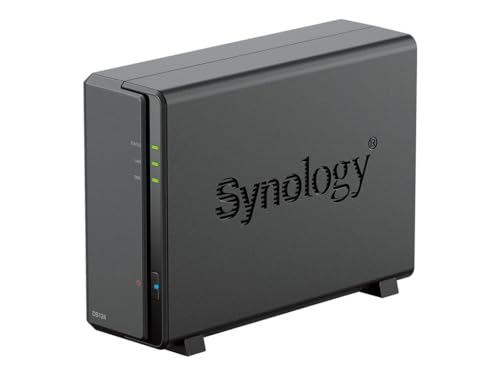
Synology DS423+ 4 Bay NAS Server
Available immediately
free shipping
  • 72 TB of storage capacity for central data storage
  • up to 226/224 MB/s sequential read/write speeds for stable data transfers
  • compatible with hard drives and SSDs for flexible storage options
Our rating
9,9
very good
2. Best value
UGREEN NASync DXP4800 Plus 4-Bay NAS, Diskless
Available immediately
free shipping
  • processes data backups at super-fast speeds with 10GbE network or USB ports for 1GB transfers in less than a second
  • offers up to 112TB of storage capacity, allowing you to store around 39 million photos or 76,000 films
  • provides various RAID options for enhanced data protection and retrieval in case of drive failure
Our rating
9,6
very good
UGREEN DXP4800 Pro 4-Bay NAS, Intel Core i3, 8GB RAM, Diskless
Available immediately
free shipping
  • processor performance: a 6-core 8-thread processor with up to 4.5 GHz turbo enables fast multitasking and smooth operation of virtual machines and containers
  • storage capacity: up to 144 terabytes using four hard drives and two M.2 solid state drives, allowing large libraries and media collections
  • backup options: offers multiple RAID configurations (0, 1, 5 and 10) for a balance of capacity, performance and protection; includes a data vault feature that hides and encrypts sensitive files
Our rating
9,6
very good
100+ purchases last month
Synology DS224+ 2 Bay NAS
Available immediately
free shipping
  • high-performance processor enables speedy data transfers
  • flexible storage options with compatibility for both hard drives and SSDs
  • back up and restore critical devices and data efficiently
Our rating
9,6
very good
5. Bestseller
Seagate IronWolf Pro 8TB Internal NAS Hard Drive ST8000NTZ01
Available immediately
free shipping
  • Backup options include complimentary 3 year Rescue Data Recovery Services for zero-cost data recovery
  • IronWolf Health Management helps protect data with prevention, intervention and recovery recommendations to keep the system healthy
  • Optimised for NAS with AgileArray featuring dual-plane balancing, TLER and rotational vibration sensors to deliver strong RAID performance in multi-bay environments
Our rating
9,5
very good
Seagate 10 TB IronWolf NAS Hard Drive ST10000VN0008
Available immediately
free shipping
  • 10TB storage capacity
  • Compatible with hard drives and SSDs
  • Data sharing and synchronisation support
Our rating
9,5
very good
Synology DS224+ 8TB NAS Solution
Available immediately
free shipping
  • 8TB storage capacity with two 4TB drives
  • various intuitive backup and restoration options for critical data and devices
  • compatible with both hard drives and SSDs
Our rating
9,4
good
UGREEN DH2300 2-Bay Desktop NAS, Diskless
Available immediately
free shipping
  • 64 terabytes of storage capacity for backing up files, photos and videos
  • on-device backup with no ongoing cloud storage charges
  • data sharing across Windows, macOS, Android, iOS, web browsers and smart TVs with secure access from any device and sharing to family via QR codes or links
Our rating
9,4
good
Seagate IronWolf 8TB NAS Hard Drive (ST8000VNZ02)
Available immediately
free shipping
  • storage capacity of up to 16 terabytes to store large amounts of data
  • three-year data recovery service included to help restore data if it is lost
  • increased file sharing performance for NAS environments with multiple users
Our rating
9,3
good
Synology DS225+ 2-Bay Diskless NAS
Coming soon
free shipping
  • processor power: the device is powered by a quad-core intel celeron j4125 processor
  • memory capacity: two gigabytes of non-ECC ddr4 sodimm by default, upgradeable to six gigabytes (two gigabytes plus four gigabytes) with supported memory modules
  • drive compatibility: this model requires compatible drives; consult the Synology compatibility list for supported hard drives and SSDs
Our rating
9,3
good
Synology DS223J 2-Bay NAS
Available immediately
free shipping
  • processes large volumes of data up to 36TB
  • offers various backup options for media library or document repository
  • allows secure access, sharing, and synchronisation of files and media from anywhere
Our rating
9,3
good
50+ purchases last month
Seagate IronWolf 2TB Internal NAS Hard Drive ST2000VNZ03
Available immediately
free shipping
  • storage capacity: up to 16 terabytes of storage and a cache of up to 256 megabytes to speed data access
  • backup options: three-year data recovery services included
  • data sharing and synchronization: enhanced file-sharing performance for multi-user NAS environments
Our rating
9,3
good
50+ purchases last month
Seagate IronWolf 4TB NAS Hard Drive ST4000VNZ06
Available immediately
free shipping
  • powerhouse performance for up to eight-bay, multi-user NAS environments
  • 4 terabytes of storage with cache of up to 64 megabytes
  • compatible with NAS enclosures for seamless integration of hard drives
Our rating
9,1
good
500+ purchases last month
UGREEN NASync DH4300 Plus 4-Bay Desktop NAS (Diskless)
Available immediately
free shipping
  • processor performance: eight-core processor using a76 and a55 cores for efficient multitasking and smooth operation with 2.5 gigabit ethernet for fast transfers
  • storage capacity: up to 128 terabytes of storage for backing up photos videos and other files with room for future growth
  • backup options: local storage with no monthly cloud fees for storing memories without ongoing subscription
Our rating
9,1
good
BUFFALO LinkStation 210 2TB 1-Bay NAS (HDD Included)
Available immediately
free shipping
  • two terabytes of storage in one drive bay with the hard disk drive included
  • automated backups for multiple computers and devices using the included backup software to protect data on Windows and macOS
  • securely share files with family and friends by setting individual access restrictions and access the central storage from anywhere via the personal cloud service
Our rating
9,0
good
Synology DiskStation DS124 1 Bay NAS
Available immediately
free shipping
  • multi-platform access for consolidating and owning data
  • data sync and sharing for seamless device and system integration
  • file backup available to multiple destinations
Our rating
8,9
good

Similar NAS Drive comparisons

NAS Drives buying guide: How to choose the right product from the above NAS Drives test or comparison

What is a NAS Drive and Why Do We Need One?

Understanding NAS Drives

A NAS drive, short for Network-Attached Storage, is a dedicated file storage system that connects to your home or office network. This means you can store and access files from multiple devices, like laptops, smartphones, or tablets, without needing to rely on external hardware such as USB drives or local hard drives. Imagine having a personal cloud right in your home – that’s what a NAS drive offers.

The Benefits of Using a NAS Drive

We all generate vast amounts of data, whether it’s family photos, work documents, or multimedia files. A NAS drive helps us manage these files by centralising them in one location. This not only simplifies access for everyone in the household or office but also enhances data security since important files can be backed up regularly. Think about how much easier it would be to find a specific photo from a family vacation if everything was neatly organised in one place!

How to Choose the Right NAS Drive for Your Needs

Assessing Your Storage Requirements

Before diving into available NAS models, we should first consider how much storage we actually need. If we primarily store documents and a few images, a smaller capacity might suffice. However, if our collection includes high-resolution videos or extensive photo libraries, opting for a larger capacity or one that can be expanded later on is wise.

Considering User Access and Security Features

Who will be accessing the NAS drive? If it’s just us, basic user access might be enough, but if multiple family members or colleagues will share the drive, we should look for models that allow for custom user permissions. Additionally, if we handle sensitive data, encryption features will protect our information from unauthorised access.

Evaluating Performance and Connectivity Options

Speed is critical when transferring files, especially large ones. Most NAS drives come with Gigabit Ethernet ports, but some offer faster connections which could significantly reduce transfer times, particularly useful for those of us working with large video files. Furthermore, features like dual-band Wi-Fi support can enhance wireless access for devices that might not be hardwired.

Setting Up Your NAS Drive: A Step-by-Step Guide

Unboxing and Initial Setup

Once we’ve chosen our NAS drive, the first step is unboxing and setting it up physically. We’ll need to connect it to our router via an Ethernet cable and plug it into a power source. It’s often as simple as that! Many models come with easy-to-follow manuals or setup wizards that guide us through any initial installation processes.

Configuring the Software

After the physical setup, we’ll need to configure the NAS software. This often involves accessing the drive through a web browser by typing in an IP address provided in the documentation. From there, we can set up user accounts, choose file-sharing protocols, and adjust settings according to how we wish to access our files. Expect this process to take anywhere from a few minutes to an hour, depending on how extensive our customisation needs are.

Maximising the Use of Your NAS Drive: Tips and Tricks

Organising Your Files Effectively

To make the most of our NAS drive, organising files properly is key. We should create folders categorised by type or project (like ‘Family’, ‘Work’, ‘Media’), making it easier to locate what we need quickly. Additionally, using consistent naming conventions helps us keep track of files, especially important in shared environments.

Implementing a Backup Strategy

To ensure our files remain safe, we should implement a regular backup strategy. Most NAS drives come with built-in software that allows us to schedule automatic backups to an external drive or even to a cloud service. This not only protects against data loss but also provides peace of mind knowing our files are securely backed up.

Comparing Top NAS Drives on the Market: Our Recommendations

Best for Home Use

For family use, we recommend the Synology DiskStation series. They’re user-friendly, offer excellent media streaming capabilities, and come with robust apps for managing personal files.

Best for Small Business Applications

For small businesses requiring file sharing and collaboration, the QNAP Turbo NAS series stands out. With their powerful processing capabilities and advanced security features, they’re perfect for professionals who need reliable and fast access to data.

Best Budget Option

If we’re looking for affordability without sacrificing quality, the WD My Cloud Home is a fantastic entry-level option. It provides ample storage and straightforward setup, ideal for newcomers to the NAS world.


Table of contents
  1. What is a NAS Drive and Why Do We Need One?
  2. How to Choose the Right NAS Drive for Your Needs
  3. Setting Up Your NAS Drive: A Step-by-Step Guide
  4. Maximising the Use of Your NAS Drive: Tips and Tricks
  5. Comparing Top NAS Drives on the Market: Our Recommendations

Overview

1. Comparison winner
Synology DS423+ 4 Bay NAS Server
Our rating
9,9
very good
Synology DS423+ 4 Bay NAS ServerAvailable immediately
2. Best value
UGREEN NASync DXP4800 Plus 4-Bay NAS, Diskless
Our rating
9,6
very good
UGREEN NASync DXP4800 Plus 4-Bay NAS, DisklessAvailable immediately
UGREEN DXP4800 Pro 4-Bay NAS, Intel Core i3, 8GB RAM, Diskless
Our rating
9,6
very good
UGREEN DXP4800 Pro 4-Bay NAS, Intel Core i3, 8GB RAM, DisklessAvailable immediately
Synology DS224+ 2 Bay NAS
Our rating
9,6
very good
Synology DS224+ 2 Bay NASAvailable immediately
5. Bestseller
Seagate IronWolf Pro 8TB Internal NAS Hard Drive ST8000NTZ01
Our rating
9,5
very good
Seagate IronWolf Pro 8TB Internal NAS Hard Drive ST8000NTZ01Available immediately
Seagate 10 TB IronWolf NAS Hard Drive ST10000VN0008
Our rating
9,5
very good
Seagate 10 TB IronWolf NAS Hard Drive ST10000VN0008Available immediately
Synology DS224+ 8TB NAS Solution
Our rating
9,4
good
Synology DS224+ 8TB NAS SolutionAvailable immediately
UGREEN DH2300 2-Bay Desktop NAS, Diskless
Our rating
9,4
good
UGREEN DH2300 2-Bay Desktop NAS, DisklessAvailable immediately
Our product comparisons are:
Always up to date:
At most every 120 days, we update each category with new products and research developments in the top rankings. This ensures that our recommendations are always up to date
Neutral and independent:
Our tests and comparisons are objective and fact-based. Manufacturers have no influence on the ratings. We aim to provide greater transparency in the market, thereby promoting product quality.
Method-driven
In our tests & comparison tables, we only include products that meet our minimum standards. This ensures that you can find the perfect product for your needs from a wide selection.
Similar tests and comparisons - Computer Equipment