Understanding Gsm Cameras: What You Need to Know
What is a GSM Camera?
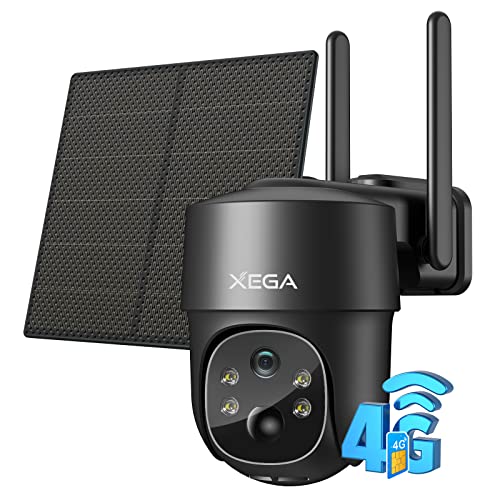
GSM cameras, or Global System for Mobile Communications cameras, are a type of surveillance device that uses mobile networks for connectivity. This means they can send and receive data without needing to be connected to Wi-Fi or wired networks. Imagine you’re at your holiday home and you want to keep an eye on things. A GSM camera allows you to do this simply via your mobile network. When motion is detected, the camera can send alerts straight to your phone, enabling you to respond immediately.
How Do GSM Cameras Work?
GSM cameras operate using a SIM card, similar to the ones in mobile phones. They communicate over the mobile network, allowing you to access live footage wherever you are, provided you have cellular service. This could be particularly practical if you’re in an area with limited internet access but still want security coverage. When setting up the camera, you simply insert a SIM card, much like when you set up a new phone.
What Are the Typical Uses?
These cameras are often used for home security, monitoring pets, or keeping an eye on properties that may be unoccupied for long periods. For instance, if you travel frequently, having a GSM camera installed allows you to check in at any time, providing peace of mind knowing that your home is secure.
Top Features to Look For in a Gsm Camera
Video Quality
When selecting a GSM camera, prioritise video quality. Look for a camera that offers high-definition (HD) resolution at a minimum of 1080p. This ensures that the footage is crisp and clear, enabling easy identification of details like faces or licence plates.
Night Vision Capability
Another critical feature is night vision. Many incidents occur after dark, so a camera with good night vision capabilities ensures that you can still monitor your property safely at any hour. Some cameras use infrared technology that allows clear images in low light conditions.
Motion Detection and Alerts
A good GSM camera should have motion detection features that allow it to send alerts to your mobile device when it detects movement. This is particularly useful for identifying suspicious activity or simply monitoring pets when you aren’t home.
Storage Options
Consider how the camera stores footage. Some cameras come with cloud storage options while others may store footage on local SD cards. Cloud storage has the advantage of keeping your data safe and accessible from anywhere but may require a subscription.
Choosing the Right Gsm Camera for Your Needs
Assessing Your Environment
To select the right GSM camera, begin by assessing where you plan to install it. Indoor cameras differ significantly from outdoor models. Outdoor cameras are built to withstand environmental conditions like rain or snow, while indoor cameras may prioritise design and aesthetics.
Number of Cameras Required
Next, consider how many cameras you need. For a comprehensive security setup, you might choose to install multiple cameras covering different angles or areas of your property. Think of it like setting up multiple eyes, giving you a full view of your space.
Budget Considerations
Finally, your budget will significantly influence your choice. There are options across a range of price points, so determine what features are essential versus those that are nice to have. Investing in a slightly higher-quality camera upfront can save you from needing replacements or additional purchases down the line.
Installation and Setup: A Simple Guide to Get Started
Unboxing and Initial Setup
Once you’ve chosen your GSM camera, begin by unboxing the device and reviewing the manual. Ensure all components are present, including the power adapter and any mounting hardware. This will typically include anchors and screws for wall installation parallel to your intended placement.
Inserting the SIM Card and Powering Up
Before installation, insert the SIM card into the camera. Make sure to insert it correctly as outlined in the manual. Once the SIM card is in place, connect the camera to power and turn it on. Most cameras will have a small light indicating when they are powered up.
Connecting to Your Mobile Device
To monitor your camera, download the manufacturer’s app on your smartphone. Follow the app’s instructions for linking your camera. This usually involves scanning a QR code generated by the camera or entering a code displayed on the camera screen. Once connected, you should be able to see live footage right from your phone.
Maintenance Tips for Your Gsm Camera
Regular Software Updates
Regularly check for software updates for your GSM camera. Manufacturers occasionally release updates that enhance functionality or security. Updating the device ensures you have the latest features and protection against vulnerabilities.
Physical Cleaning
Keep the camera lenses clean for optimal performance. Use a soft, lint-free cloth to wipe the lens gently. Clean lenses can significantly improve video clarity, especially during rain, dust storms, or after pollen seasons.
Monitoring Battery and Signal Strength
Pay attention to the battery level and the signal strength of the GSM network. Weak signals can lead to poor performance. From time to time, repositioning the camera or checking the SIM card can help maintain the best connection.