Updated:30 October 2026
Rank 1-10 of the best Ergonomic Keyboards
Our recommendation Price Customer rating
1. Comparison winner
Kensington Pro Fit Ergo Wireless Keyboard K75401UK
Available immediately
free shipping
  • ergonomic design with split and slope keyboard positions hands for comfort
  • adjustable reverse tilt enables natural hand, wrist, and forearm alignment
  • connect to multiple devices using 2.4 GHz and Bluetooth 4.0 LE wireless capabilities
Our rating
9,6
very good
2. Best value
Arteck Ergonomic USB Wired Keyboard
Available immediately
free shipping
  • ergonomic split design positions wrists and forearms naturally
  • soft cushioned wrist rest provides comfortable support
Our rating
9,6
very good
50+ purchases last month
ProtoArc EK01 Plus Backlit Wireless Ergonomic Keyboard with Wrist Rest
Available immediately
free shipping
  • ergonomic design with full-size layout and curved, split keyframes for reduced wrist and forearm strain
  • adjustable tilt mechanism with four options and cushioned wrist rest for improved typing comfort
  • connect to multiple devices using Bluetooth and USB, supporting up to three connections at once
Our rating
9,6
very good
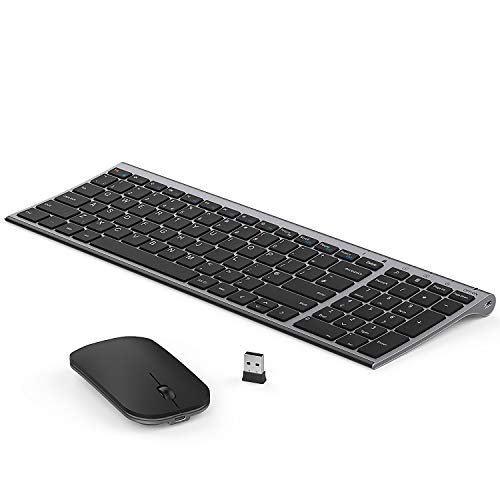
Perixx Periduo-605 Wireless Keyboard and Mouse Combo
Available immediately
free shipping
  • ergonomic design for comfort and reduced hand pressure
  • adjustable keyboard tilt for customised typing angle
  • connect various devices through seamless connectivity
Our rating
9,3
good
100+ purchases last month
5. Bestseller
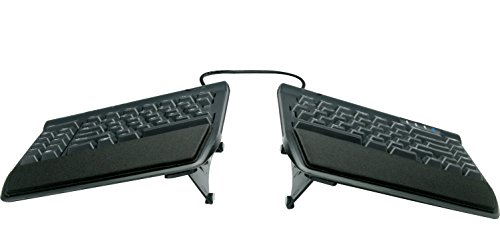
KINESIS Freestyle2 Ergonomic Keyboard w/ VIP3 Lifters
Available in a few days
free shipping
  • ergonomic design with split keyboard allows natural hand, wrist and forearm positions
  • adjustable tilting enables 5, 10, or 15 degrees of angling for optimal typing posture
  • multidevice connection capability omitted
Our rating
9,3
good
Logitech Wave Keys for Mac Wireless Ergonomic Keyboard, UK Layout
Available immediately
free shipping
  • ergonomic design keeps wrists comfortable for long typing sessions
  • adjustable tilt allows for a more personalised typing angle
  • connects to multiple devices such as MacBook, iPad, or iPhone via Bluetooth
Our rating
9,0
good
Kensington Pro Fit Ergo KB675 EQ Wireless Keyboard, UK Layout, K75491UK
Available immediately
free shipping
  • designed for comfortable typing with an ergonomic design
  • tilt can be adjusted for personalised comfort
  • connects to up to three devices, two via bluetooth and one via USB-A receiver
Our rating
9,0
good
Perixx PERIBOARD-512 Ergonomic Keyboard
Available immediately
free shipping
  • ergonomic split and curved design aligns with natural hand position
  • integrated palm rest reduces wrist strain
Our rating
9,0
good
50+ purchases last month
CHERRY KC 4500 ERGO Ergonomic Keyboard, UK Layout
Available immediately
free shipping
  • ergonomic design with integrated number pad and palm rest for comfortable typing
  • tilt angle can be adjusted using detachable rubber feet to prevent slipping
  • softly padded palm rest with memory foam to encourage fatigue-free typing
Our rating
9,0
good
50+ purchases last month
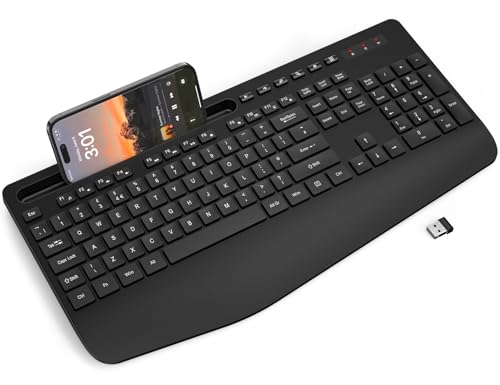
SABLUTE KN21 Full-Size Wireless Keyboard
Available immediately
free shipping
  • ergonomic design with generous palm rest for reduced wrist stress
  • adjustable tilt for improved typing position
  • supports multiple device connectivity via built-in cradle
Our rating
8,8
good

Similar Ergonomic Keyboard comparisons

Ergonomic Keyboards buying guide: How to choose the right product from the above Ergonomic Keyboards test or comparison

Understanding Ergonomic Keyboards: What They Are and How They Work

What is an Ergonomic Keyboard?

Ergonomic keyboards are designed specifically to support your hands and wrists in a more natural position while typing. Instead of the traditional flat keyboard, these devices often have a split or curved layout that attempts to reduce strain. Imagine typing on a keyboard that allows your wrists to sit comfortably without bending at awkward angles. This is achieved by aligning the keyboard with the natural posture of your hands, which can help in preventing discomfort and long-term injuries.

How Do They Work?

These keyboards come with various designs that cater to different typing styles. Some include key tilts, wrist rests, and even built-in palm supports. The idea is that by designing a keyboard that aligns more closely with the natural movement and positioning of your arms and hands, you can type for longer periods without experiencing fatigue. This is particularly beneficial for those who spend several hours a day typing, as it encourages healthier typing habits.

Key Features to Look for: Comfort, Design, and Functionality

Prioritising Comfort

When choosing an ergonomic keyboard, comfort should be your foremost concern. Look for features such as padded wrist rests and adjustable height settings. A comfortable keyboard can significantly enhance your typing experience, allowing you to maintain focus for longer durations without feeling discomfort.

Thoughtful Design Elements

The design of the keyboard plays a crucial role in its effectiveness. Many ergonomic keyboards feature a split design that allows your hands to adopt a more relaxed posture. Others may include a tented shape that raises the middle section of the keyboard. Pay attention to how the keys are shaped and spaced; well-designed keys lessen finger strain.

Functionality Features

Different ergonomic keyboards come with various functionalities, such as programmable keys or dedicated multimedia controls. These features can enhance productivity by allowing you to customise your keyboard to suit your specific needs, whether that involves shortcuts for frequently used applications or easy access to volume controls.

Choosing the Right Size and Layout for Your Needs

Assessing Your Workspace

Before purchasing, consider the available space on your desk. Some ergonomic keyboards are compact, making them ideal for smaller workstations, while others may be larger but offer additional features. Think about how much surface area you can dedicate to a keyboard and ensure that it fits comfortably within your personal setup.

Understanding Different Layouts

Ergonomic keyboards come in various layouts including QWERTY and alternative formats designed specifically for ergonomic use. It’s vital to choose a layout that you are comfortable with, as it will affect your typing speed and overall user experience. If you plan to switch layouts, be prepared for an adjustment period.

Exploring Our Recommendations

While there are many ergonomic keyboards out there, we’ve identified some standout options for 2023. These keyboards feature a strong emphasis on comfort, innovative design, and additional functionalities. Keyboards that balance aesthetics and performance will not only boost your typing comfort but also seamlessly integrate into your workspace, making them not just tools but also attractive fixtures on your desk.

Tips for Transitioning to an Ergonomic Keyboard: Getting Used to a New Style

Embrace the Change

Transitioning to an ergonomic keyboard can take some time as your muscle memory adjusts. Start using your new keyboard for short periods, gradually increasing usage as you become more comfortable. It’s normal to feel a little clumsy initially, but in time, you’ll grow accustomed to the new layout and features.

Practice Makes Perfect

Consider engaging in typing exercises or games designed for ergonomic keyboards. These can help reinforce the new muscle movements and improve your overall speed and accuracy. Most importantly, listen to your body; if you experience discomfort, take breaks and adjust your positioning until you find a comfortable setup.


Table of contents
  1. Understanding Ergonomic Keyboards: What They Are and How They Work
  2. Key Features to Look for: Comfort, Design, and Functionality
  3. Choosing the Right Size and Layout for Your Needs
  4. Top Ergonomic Keyboards of 2023: Our Recommended Picks
  5. Tips for Transitioning to an Ergonomic Keyboard: Getting Used to a New Style

Overview

1. Comparison winner
Kensington Pro Fit Ergo Wireless Keyboard K75401UK
Our rating
9,6
very good
Kensington Pro Fit Ergo Wireless Keyboard K75401UKAvailable immediately
2. Best value
Arteck Ergonomic USB Wired Keyboard
Our rating
9,6
very good
Arteck Ergonomic USB Wired KeyboardAvailable immediately
ProtoArc EK01 Plus Backlit Wireless Ergonomic Keyboard with Wrist Rest
Our rating
9,6
very good
ProtoArc EK01 Plus Backlit Wireless Ergonomic Keyboard with Wrist RestAvailable immediately
Perixx Periduo-605 Wireless Keyboard and Mouse Combo
Our rating
9,3
good
Perixx Periduo-605 Wireless Keyboard and Mouse ComboAvailable immediately
5. Bestseller
KINESIS Freestyle2 Ergonomic Keyboard w/ VIP3 Lifters
Our rating
9,3
good
KINESIS Freestyle2 Ergonomic Keyboard w/ VIP3 LiftersAvailable in a few days
Logitech Wave Keys for Mac Wireless Ergonomic Keyboard, UK Layout
Our rating
9,0
good
Logitech Wave Keys for Mac Wireless Ergonomic Keyboard, UK LayoutAvailable immediately
Kensington Pro Fit Ergo KB675 EQ Wireless Keyboard, UK Layout, K75491UK
Our rating
9,0
good
Kensington Pro Fit Ergo KB675 EQ Wireless Keyboard, UK Layout, K75491UKAvailable immediately
Perixx PERIBOARD-512 Ergonomic Keyboard
Our rating
9,0
good
Perixx PERIBOARD-512 Ergonomic KeyboardAvailable immediately
Our product comparisons are:
Always up to date:
At most every 120 days, we update each category with new products and research developments in the top rankings. This ensures that our recommendations are always up to date
Neutral and independent:
Our tests and comparisons are objective and fact-based. Manufacturers have no influence on the ratings. We aim to provide greater transparency in the market, thereby promoting product quality.
Method-driven
In our tests & comparison tables, we only include products that meet our minimum standards. This ensures that you can find the perfect product for your needs from a wide selection.
Similar tests and comparisons - Technology Accessories