Updated:31 October 2026
Rank 1-16 of the best Smart Pens
Our recommendation Price Customer rating
1. Comparison winner
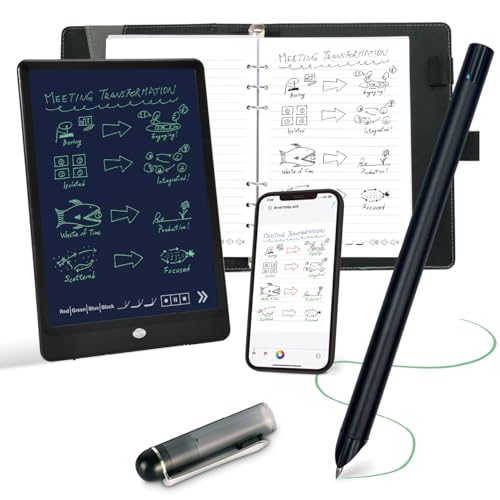
Ophaya Smart Pen 3-in-1 Digital Notebook Set with 10-Inch LCD Writing Tablet
Available immediately
free shipping
  • Charging time: charging is via the included charging cable
  • Offline use: the pen stores handwritten pages offline and automatically synchronises when connected to the Ophaya Pro+ app
  • Precision: writes naturally on real paper and synchronises notes digitally to the Ophaya Pro+ app
Our rating
9,8
very good
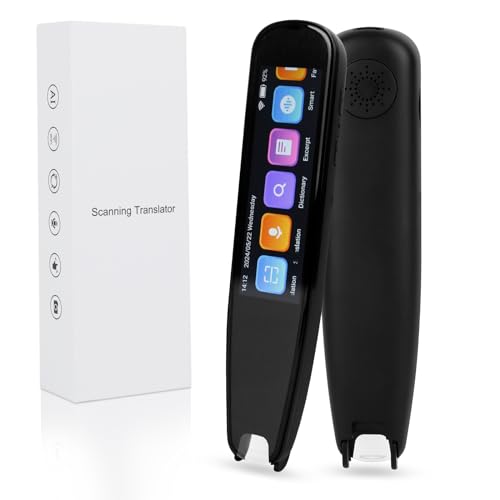
NEWYES Scan Reader Pen 4 Pro, 3.99-inch touchscreen, Text-to-Speech Reading Pen for Students
Available immediately
free shipping
  • quick startup and fast scanning to enable rapid translation after turning on
  • translation accuracy around 95 percent for faster conversations
  • online translation supports 112 languages and offline translation supports 19 languages without network access
Our rating
9,6
very good
NEWYES SyncPen 3.0 Digital Note-taking Set
Available immediately
free shipping
  • 30 minutes charging time
  • 10 hours battery life
  • high precision for accurate writing and drawing
Our rating
9,6
very good
4. Best value
NEWYES Scan Reader Pen - Dyslexia Support, Scan-to-Text & Translation
Available immediately
free shipping
  • Fast scanning delivers quick results with minimal waiting time
  • Precise text scanning reads printed text aloud clearly and highlights the words to help you follow along
  • Works with standard devices to scan text, store it and translate across languages
Our rating
9,6
very good
5. Bestseller
Metapen A8 Stylus Pen for iPad
Available immediately
free shipping
  • charge time: fast charging via USB-C with a full 30 minute charge delivering up to 10 hours of use; 1 minute of charging provides around 50 minutes of use; 4 minutes provides around 2 hours of use
  • battery life: lasts up to 10 hours on a full charge
  • precision: pixel level accuracy of 0.1 mm with high responsiveness for writing small words and drawing fine lines; notes that pressure sensitivity is not supported
Our rating
9,5
very good
Reading Pen with Scan Reader and 142-Language Translator
Available immediately
free shipping
  • charging time not applicable
  • battery life not applicable
  • precision: translation accuracy of 98% and scanning accuracy recognition rate up to 99%
Our rating
9,5
very good
Metapen Pencil Air8 Stylus for iPad
Available immediately
free shipping
  • charge time to full is around 45 minutes via USB‑C cable
  • battery life up to 20 hours per charge and a two-minute charge provides around two hours of use
  • precision up to 0.1 millimetre pixel level enables writing small text and drawing fine lines; it does not support pressure sensitivity
Our rating
9,5
very good
XNote Smart Pen & Notebook Starter Set – AI-powered digital note taking, real paper writing syncs to the app, Bluetooth notebook, includes 5 ink refills
Available immediately
free shipping
  • Charging time: around 90 minutes to fully recharge the pen
  • Battery life: up to 17 hours of continuous use on a single charge
  • Precision: real pen and paper feel with instant stroke capture synced to the XNote app for accurate notes
Our rating
9,5
very good
HuuppHip OCR Scan Reader Pen, 112-Language Translator
Available immediately
free shipping
  • charging time: not specified
  • battery life: operates continuously for up to 4 hours and a standby time of 160 hours
  • precision: recognition rate up to 98% and capable of scanning 3000 characters per minute
Our rating
9,5
very good
Metapen Pencil A11 Stylus for iPad
Available immediately
free shipping
  • full charge time is 30 minutes via USB-C
  • up to 10 hours of use on a full charge
  • pixel level accuracy of 0.1 mm with the new generation P2 chip for precise writing
Our rating
9,4
good
500+ purchases last month
Metapen Pencil A8 Stylus Pen for iPad, White
Available immediately
free shipping
  • charges fully in 30 minutes via USB-C, with a 1-minute charge providing 50 minutes of use and a full charge lasting up to 10 hours
  • provides accurate performance with a precision of up to 0.1 mm
  • supports palm rejection allowing you to rest your palm on the screen during use
Our rating
9,3
good
Dakexiong Smart Paper Pen for Lenovo Smart Paper
Available immediately
free shipping
  • Ladezeit: no charging time is required because the stylus uses electromagnetic resonance technology
  • Akkulaufzeit: no battery life is involved because the stylus has no built-in battery
  • Präzision: 25 milliseconds latency and 4096 levels of pressure sensitivity deliver precise writing and drawing
Our rating
8,9
good
MEKO Dual-Tip Universal Stylus Pen with Magnetic Cap, White
Available immediately
free shipping
  • Ladezeit: no charging time required
  • Präzision: the disc tip offers high precision and high sensitivity with no lag for handwriting and detailed drawing, while the fibre tip provides finger-like control with improved accuracy for everyday tasks such as scrolling
  • Kompatibilität mit Geräten: works with all capacitive touch screens including iPhone, iPad, iPad Pro, iPad Mini, Nintendo Switch, Samsung Galaxy devices, Android tablets and phones, Kindle and Chromebook
Our rating
8,5
good
50+ purchases last month
iPad Stylus Pen, White
Available immediately
free shipping
  • fast charging via USB-C with a full charge in about 13 minutes
  • battery life exceeds 10 hours of continuous use
  • tilt sensitivity adjusts line thickness according to pen angle
Our rating
8,5
good
Stylus Pen for iPad (2018–2026)
Available immediately
free shipping
  • Charging time: full charge in around 15 minutes via USB-C, enabling up to 10 hours of use; a 1 minute charge provides around 50 minutes of use, a 5 minute charge provides around 4 hours
  • Battery life: up to 10 hours of continuous use on a full charge with automatic shutdown after 5 minutes of inactivity to save energy
  • Precision: pixel-level accuracy up to 0.1 mm using a smart chip; smooth POM nib and four extra nibs; two built-in magnets help keep the stylus attached to your iPad when not in use
Our rating
8,4
good
3-Pack Touchscreen Stylus Pens
Available immediately
free shipping
  • Precision: the disk tip at one end provides high accuracy for writing and drawing
  • Compatibility with devices: universal compatibility with Apple, Samsung, Motorola, Lenovo, Xiaomi and other touch screen devices as well as major operating systems such as Google Android and Microsoft
  • Design and convenience: lightweight 5.2 inch plastic stylus that is easy to hold and portable; features a 2-in-1 design with a disk tip for precise input and a silicone tip for smooth scrolling, and battery-free operation requiring no charging
Our rating
8,3
good

Similar Smart Pen comparisons

Smart Pens buying guide: How to choose the right product from the above Smart Pens test or comparison

What is a Smart Pen and How Does It Work?

Understanding the Concept of Smart Pens

A smart pen is a remarkable device that bridges the gap between the traditional act of writing and the digital world. Imagine being able to write with a pen on ordinary paper while simultaneously saving everything you jot down to your digital devices. This functionality stems from an embedded camera and sensors in the pen, which track your hand movements and translate them into digital format. This is particularly useful for students, professionals, and anyone who enjoys the tactile feel of pen on paper but also desires the convenience of having their notes available digitally.

How Smart Pens Capture Your Writing

When you write with a smart pen, it captures your strokes in real-time. The pen registers the movements and sends the data to a companion app on your smartphone or tablet via Bluetooth. You can often see your handwritten notes appear instantly on your device’s screen. Many smart pens also have features like audio recording and can sync the audio with your notes, making them invaluable for lectures or meetings—imagine being able to listen back to a conversation while viewing exactly what you wrote at that moment.

Key Features to Consider When Buying a Smart Pen

Writing Technology and Compatibility

When selecting a smart pen, it’s crucial to consider the technology it utilizes. Some pens work exclusively with special digital paper, while others allow flexibility to use any type of paper. Ensure that the pen is compatible with your preferred devices and apps, as some may only work with specific operating systems, affecting your overall experience.

Battery Life and Recharge Mechanisms

Battery life can vary significantly between smart pens; therefore, assess how often the pen needs charging. Some models offer long-lasting batteries with quick recharge times, while others might require more frequent attention. We recommend looking for a pen that provides at least a few weeks of use on a single charge, making it more convenient for day-to-day use.

Storage Capacity and Syncing Options

Another important factor is the pen’s storage capability. Some smart pens allow you to store numerous pages of notes before syncing them to your device, which is excellent if you prefer writing in places without immediate digital access. Look for options that smoothly sync your notes to the cloud or specific applications, allowing for easy access anytime, anywhere.

User Experience and Ergonomics

The feel of the pen in your hand is equally important. Consider the grip and weight of the pen—some people prefer a heavier pen for control, while others like a lighter model for longer writing sessions. Reading reviews can provide insights into the user experience, helping you choose a model that feels comfortable for extended use.

Top Smart Pens on the Market: Our Recommendations

Popular Smart Pen Choices

In our search for the best smart pens, we’ve identified a few standout options. The Livescribe Smartpen, for instance, is known for its robust features, including audio recording capabilities that sync with your notes, making it perfect for students. The Moleskine Smart Writing Set impresses users by combining traditional aesthetics with modern technology, allowing you to transfer handwritten notes into digital formats effortlessly. The Rocketbook Smart Reusable Notebook is also worth considering, as it pairs with special pens and allows you to digitise and erase your notes in a way that’s eco-friendly. Each of these options brings unique features to the table, appealing to different user needs and preferences.

How to Get the Most Out of Your Smart Pen

Exploring the Features and Functionalities

To fully benefit from your smart pen, start by exploring all of its features. Spend time understanding the companion app, as it typically houses various functionalities, such as search capabilities and organisation tools. Test the voice recording feature during lectures or meetings and check how easily you can access your notes later.

Creating a Structured Note-Taking Habit

Developing a structured habit around note-taking can maximise the potential of your smart pen. Use headings, bullet points, and diagrams within your notes to make them more readable and easier to review. This structure not only enhances retention but also takes advantage of the technology’s capabilities, allowing for simpler searches and retrieval later on.

Tips for Maintaining Your Smart Pen for Longevity

Proper Care and Regular Cleaning

Maintaining your smart pen includes regular cleaning and proper storage. Keep the tip free from dust and debris, as this can affect performance. Use a soft, dry cloth to wipe the casing and screen. Avoid exposing the pen to extreme temperatures and moisture, as these conditions can harm the electronics.

Updating Software and Firmware

Regularly check for updates to the app and firmware of the pen. These updates often fix bugs, add features, and improve performance. Staying up-to-date ensures that you’re making the most out of your purchase, enabling you to enjoy all the latest enhancements and functionalities available.


Table of contents
  1. What is a Smart Pen and How Does It Work?
  2. Key Features to Consider When Buying a Smart Pen
  3. Top Smart Pens on the Market: Our Recommendations
  4. How to Get the Most Out of Your Smart Pen
  5. Tips for Maintaining Your Smart Pen for Longevity

Overview

1. Comparison winner
Ophaya Smart Pen 3-in-1 Digital Notebook Set with 10-Inch LCD Writing Tablet
Our rating
9,8
very good
Ophaya Smart Pen 3-in-1 Digital Notebook Set with 10-Inch LCD Writing TabletAvailable immediately
NEWYES Scan Reader Pen 4 Pro, 3.99-inch touchscreen, Text-to-Speech Reading Pen for Students
Our rating
9,6
very good
NEWYES Scan Reader Pen 4 Pro, 3.99-inch touchscreen, Text-to-Speech Reading Pen for StudentsAvailable immediately
NEWYES SyncPen 3.0 Digital Note-taking Set
Our rating
9,6
very good
NEWYES SyncPen 3.0 Digital Note-taking SetAvailable immediately
4. Best value
NEWYES Scan Reader Pen - Dyslexia Support, Scan-to-Text & Translation
Our rating
9,6
very good
NEWYES Scan Reader Pen - Dyslexia Support, Scan-to-Text & TranslationAvailable immediately
5. Bestseller
Metapen A8 Stylus Pen for iPad
Our rating
9,5
very good
Metapen A8 Stylus Pen for iPadAvailable immediately
Reading Pen with Scan Reader and 142-Language Translator
Our rating
9,5
very good
Reading Pen with Scan Reader and 142-Language TranslatorAvailable immediately
Metapen Pencil Air8 Stylus for iPad
Our rating
9,5
very good
Metapen Pencil Air8 Stylus for iPadAvailable immediately
XNote Smart Pen & Notebook Starter Set – AI-powered digital note taking, real paper writing syncs to the app, Bluetooth notebook, includes 5 ink refills
Our rating
9,5
very good
XNote Smart Pen & Notebook Starter Set – AI-powered digital note taking, real paper writing syncs to the app, Bluetooth notebook, includes 5 ink refillsAvailable immediately
Our product comparisons are:
Always up to date:
At most every 120 days, we update each category with new products and research developments in the top rankings. This ensures that our recommendations are always up to date
Neutral and independent:
Our tests and comparisons are objective and fact-based. Manufacturers have no influence on the ratings. We aim to provide greater transparency in the market, thereby promoting product quality.
Method-driven
In our tests & comparison tables, we only include products that meet our minimum standards. This ensures that you can find the perfect product for your needs from a wide selection.
Similar tests and comparisons - Technology Accessories