Updated:27 October 2026
Rank 1-11 of the best Wireless Keyboards
Our recommendation Price Customer rating
1. Comparison winner
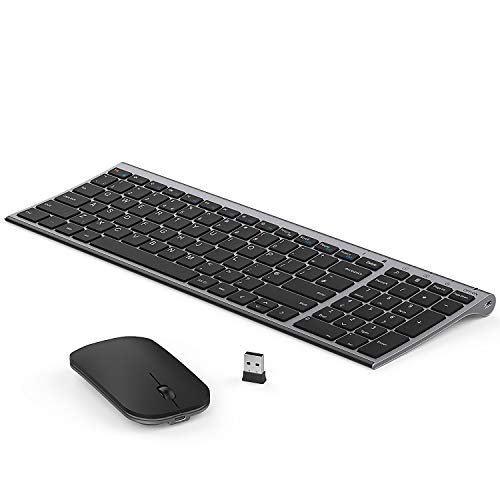
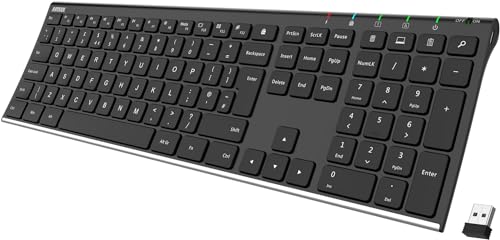
Arteck 2.4G Wireless Full-Size Keyboard with Numeric Keypad
Available immediately
free shipping
  • connect to computer via nano USB receiver
  • 6-month battery life with single charge, based on 2-hour daily use
  • compatible with QWERTY UK layout
Our rating
9,9
very good
HP 230 Wireless Mouse and Keyboard Combo, White
Available in a few weeks
free shipping
  • 2.4GHz wireless connection for freedom and reduced clutter
  • up to 16 months keyboard battery life, 12 months for the mouse
  • compatible with 12 function keys for increased productivity
Our rating
9,8
very good
500+ purchases last month
Logitech MK540 Wireless Keyboard and Mouse Combo
Available immediately
free shipping
  • wireless connection available via USB receiver with up to 10 m range
  • keyboard battery life up to 36 months, mouse up to 18 months
  • compatible with Windows 7, 8, 10 or later, and Chrome OS
Our rating
9,6
very good
4. Best value
TECURS Full-Size Wireless Keyboard, UK QWERTY Layout
Available immediately
free shipping
  • wireless 2.4G connectivity for working without cords
  • rechargeable lithium battery lasts 15 days without backlighting
  • compatible with both working and gaming environments
Our rating
9,6
very good
100+ purchases last month
5. Bestseller
HP 230 Wireless Keyboard and Mouse Set
Available in a few weeks
free shipping
  • wireless connection with 2.4GHz frequency for clutter-free and lag-free experience
  • long-lasting battery life for all-day productivity
  • compatible with devices that support standard wireless connections
Our rating
9,5
very good
HP 230 Wireless Keyboard with Number Pad
Coming soon
free shipping
  • 2.4 GHz wireless connection for a clutter-free and unrestricted work area
  • battery life up to 16 months with one set of batteries
  • easily activates all 12 function keys for enhanced productivity
Our rating
9,5
very good
Arteck 2.4G Wireless Keyboard Stainless Steel
Available immediately
free shipping
  • provides wireless connection by inserting nano USB receiver into computer
  • battery lasts up to 6 months per charge with daily use of 2 hours
  • compatible with most computers using USB
Our rating
9,1
good
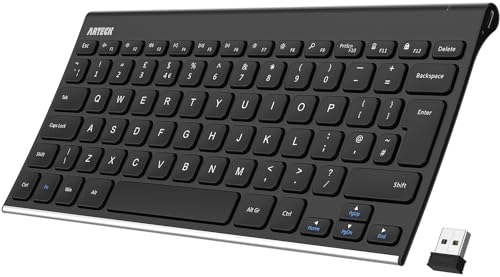
TECKNET 2.4 GHz Wireless Compact Mini Keyboard, UK Layout, Black
Available immediately
free shipping
  • wireless 2.4G technology for a cable-free connection up to 15m
  • automatic sleep design enables up to 12 months of battery life with daily use
  • compatible with Microsoft Windows 11/10/8/7/2000/XP/VISTA, Chrome OS, Linux, Smart TV
Our rating
9,0
good
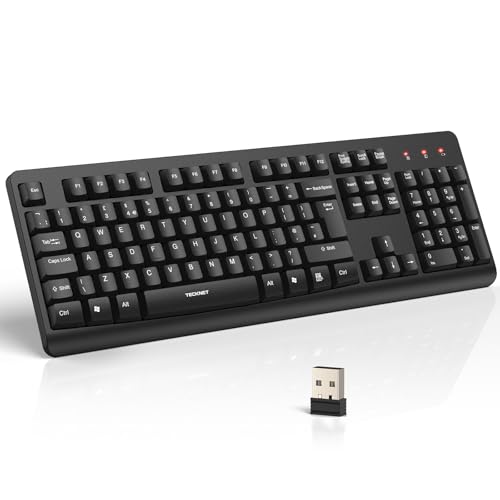
TECKNET 2.4GHz Wireless Keyboard, Full Size, UK Layout
Available immediately
free shipping
  • 2.4 GHz wireless connection offers stable connectivity up to 13 metres
  • powered by 1 AA battery with LED low-battery indicator and auto sleep mode
  • compatible with Windows 11/10/8/7, Linux, iOS 10.4 and above, suitable for desktops, PCs, and laptops
Our rating
9,0
good
300+ purchases last month
Cimetech Wireless Keyboard, QWERTY UK Full-Size, Black
Available immediately
free shipping
  • wireless connection with 2.4G technology offers a cable and clutter-free experience with a range of up to 10 metres
  • compatible with Windows, macOS, Chrome OS and Linux
  • ergonomic design with low profile keys and fold-out feet for comfort
Our rating
8,6
good
200+ purchases last month
Trust Ody II Silent Wireless Keyboard, UK Layout
Available immediately
free shipping
  • wireless connectivity with a 10m range for flexible use
  • designed with silent, low-profile keys for quiet typing
  • splash-resistant design to handle minor spills
Our rating
8,5
good
700+ purchases last month

Similar Wireless Keyboard comparisons

Wireless Keyboards buying guide: How to choose the right product from the above Wireless Keyboards test or comparison

Understanding Wireless Keyboards: What to Expect

What is a Wireless Keyboard?

A wireless keyboard connects to your computer or device without the need for a physical cord, allowing for a tidier workspace and greater ease of movement. Through technologies such as Bluetooth or a USB receiver, it communicates wirelessly, giving you flexibility and freedom to type from a distance.

Common Uses of Wireless Keyboards

Wireless keyboards are popular not just for traditional computer setups but also for Smart TVs, tablets, and other portable devices. Imagine lounging comfortably on your sofa while controlling your media centre, or typing out documents on your tablet without being tethered to a desk. This versatility makes them a practical choice for both leisure and work.

Key Features to Look For in a Wireless Keyboard

Battery Life and Power Options

Selecting a keyboard with good battery life ensures you won’t be interrupted by frequent charging. Many wireless keyboards operate for months on a single set of batteries, while others offer rechargeable options that can be plugged in via USB.

Connectivity and Range

Connectivity is crucial; keyboards typically use either Bluetooth or a wireless receiver. Bluetooth keyboards can connect comfortably with various devices, while those using a USB receiver generally offer a more stable connection. Also, consider the range: most wireless keyboards work well within a distance of up to 10 meters, so ensure this suits your usage context.

Typing Experience

The typing experience varies significantly from one keyboard to another. Some keyboards offer a soft touch and lower resistance, good for quick typing, while others provide tactile feedback for those who prefer a more traditional feel. It’s worthwhile to test the keyboard if possible, to find your preferred typing style.

Size and Design

Size matters. Depending on your workspace, you might prefer a full-sized keyboard that includes a number pad, or a more compact model if you’re short on space. Ergonomic designs are also available, promoting a more comfortable typing posture and reducing strain on your wrists.

Choosing the Right Wireless Keyboard for Your Needs

For General Use

If you’re looking for a keyboard for everyday tasks like browsing and word processing, aim for a reliable model with good battery life and comfortable key layout.

For Gaming

Gamers may want to consider a keyboard that features programmable keys and low-latency connectivity for fast responses. Many gaming keyboards also come with backlighting for an added visual flair.

For Office Work

In an office environment, opt for a wireless keyboard with a full-sized layout for optimal usability. Look for features such as quiet keys and ergonomic designs that can help reduce fatigue during long typing sessions.

Top Recommendations for Wireless Keyboards in 2023

Versatile All-Rounders

For those who need a keyboard that can do it all, consider models that combine comfort with long battery life and easy connectivity. These are great for home and office setups alike.

Compact and Portable Options

For users on the go, compact keyboards that are lightweight and easy to transport are ideal. Look for ones that include features like a built-in rechargeable battery.

Premium Choices

If budget isn’t a primary concern, exploring premium keyboards with customizable features, high-quality materials, and advanced connectivity options can elevate your typing experience significantly.

Tips for Setting Up Your Wireless Keyboard

Connecting to Your Device

When first setting up your wireless keyboard, read the instructions carefully for connecting it to your device, whether through Bluetooth pairing or with a USB receiver.

Adjusting Settings for Comfort

Once connected, take a moment to adjust settings such as key functions and backlighting (if applicable) based on your preferences, ensuring an optimal typing experience.

Battery Management

Keep an eye on battery levels and consider designating a spot for spare batteries or a charger within easy reach, ensuring you can swap them out without fuss when needed.


Table of contents
  1. Understanding Wireless Keyboards: What to Expect
  2. Key Features to Look For in a Wireless Keyboard
  3. Choosing the Right Wireless Keyboard for Your Needs
  4. Top Recommendations for Wireless Keyboards in 2023
  5. Tips for Setting Up Your Wireless Keyboard

Overview

1. Comparison winner
Arteck 2.4G Wireless Full-Size Keyboard with Numeric Keypad
Our rating
9,9
very good
Arteck 2.4G Wireless Full-Size Keyboard with Numeric KeypadAvailable immediately
HP 230 Wireless Mouse and Keyboard Combo, White
Our rating
9,8
very good
HP 230 Wireless Mouse and Keyboard Combo, WhiteAvailable in a few weeks
Logitech MK540 Wireless Keyboard and Mouse Combo
Our rating
9,6
very good
Logitech MK540 Wireless Keyboard and Mouse ComboAvailable immediately
4. Best value
TECURS Full-Size Wireless Keyboard, UK QWERTY Layout
Our rating
9,6
very good
TECURS Full-Size Wireless Keyboard, UK QWERTY LayoutAvailable immediately
5. Bestseller
HP 230 Wireless Keyboard and Mouse Set
Our rating
9,5
very good
HP 230 Wireless Keyboard and Mouse SetAvailable in a few weeks
HP 230 Wireless Keyboard with Number Pad
Our rating
9,5
very good
HP 230 Wireless Keyboard with Number PadComing soon
Arteck 2.4G Wireless Keyboard Stainless Steel
Our rating
9,1
good
Arteck 2.4G Wireless Keyboard Stainless SteelAvailable immediately
TECKNET 2.4 GHz Wireless Compact Mini Keyboard, UK Layout, Black
Our rating
9,0
good
TECKNET 2.4 GHz Wireless Compact Mini Keyboard, UK Layout, BlackAvailable immediately
Our product comparisons are:
Always up to date:
At most every 120 days, we update each category with new products and research developments in the top rankings. This ensures that our recommendations are always up to date
Neutral and independent:
Our tests and comparisons are objective and fact-based. Manufacturers have no influence on the ratings. We aim to provide greater transparency in the market, thereby promoting product quality.
Method-driven
In our tests & comparison tables, we only include products that meet our minimum standards. This ensures that you can find the perfect product for your needs from a wide selection.
Similar tests and comparisons - Technology Accessories