Updated:06 November 2026
Rank 1-14 of the best Nvme USB Adapters
Our recommendation Price Customer rating
1. Comparison winner
SABRENT M.2 NVMe/SATA SSD Enclosure EC-SNVE, 10Gbps
Available immediately
free shipping
  • data transfer speed up to 10 Gbps, using USB 3.2 Gen 2
  • compatible with NVMe M-Key and M+B Key M.2 SSDs, suitable for SSD sizes 2230, 2242, 2260, and 2280
  • constructed with aluminium and designed with air vents for effective heat dissipation
Our rating
9,8
very good
300+ purchases last month
2. Best value
UGREEN M.2 NVMe SSD Enclosure, USB 3.2 Gen 2, 10Gbps
Available immediately
free shipping
  • transmission rate up to 10Gbps for fast read and write speeds
  • compatible with M.2 NVMe SSDs, supporting M Key and B&M Key types in sizes 2230, 2242, 2260, and 2280
  • aluminium alloy shell and silicone thermal pad for efficient heat dissipation
Our rating
9,8
very good
3. Bestseller
SSK M.2 NVMe/SATA SSD Enclosure USB 3.2 Gen 2 10Gbps
Available immediately
free shipping
  • data transfer speed up to 10Gbps with USB-C Gen 2 or Thunderbolt 3, compatible with USB 3.1 and 3.0 up to 5Gbps
  • compatible with NVMe PCIE and SATA M.2 SSDs, supports M-Key and B+M connectors, applicable to sizes 2242, 2260, 2280
  • aluminium alloy shell for efficient heat dissipation
Our rating
9,8
very good
UGREEN 10Gbps M.2 NVMe & SATA SSD Enclosure
Available immediately
free shipping
  • USB 3.2 Gen 2 supports data transfer speeds of up to 10 Gbps with NVMe SSDs and 6 Gbps with SATA SSDs
  • Supports M.2 NVMe and SATA SSDs with M Key or B+M Key connectors in 2230, 2242, 2260 and 2280 sizes, with capacities of up to 8 TB; does not support mSATA SSDs
  • The aluminium enclosure and thermal pad help dissipate heat from the SSD during use
Our rating
9,6
very good
300+ purchases last month
ACASIS M.2 NVMe and SATA SSD Docking Station
Available immediately
free shipping
  • up to 10 Gbps data transfer speed
  • supports M.2 NVMe and SATA SSDs
  • aluminium construction provides effective heat dissipation
Our rating
9,6
very good
iDSOniX M.2 SSD Enclosure Adapter
Available immediately
free shipping
  • supports up to 10Gbps transfer speeds for NVMe SSDs and 6Gbps for AHCI SATA/NGFF SSDs
  • compatible with M-Key/M+B Key NVMe PCIe SSDs and M+B Key AHCI SATA/NGFF SSDs
  • advanced heat dissipation with aluminium alloy, vest, and pad for enhanced thermal performance
Our rating
9,5
very good
FIDECO M.2 NVMe SSD Enclosure, USB 3.2 Gen 2
Available immediately
free shipping
  • Transfer speeds of up to 10 Gbit/s are supported through USB 3.2 Gen 2, with UASP support
  • Compatible with M.2 NVMe SSDs with M key or M+B key, in 2230, 2242, 2260 and 2280 sizes; M.2 SATA SSDs are not supported
  • A thermal pad makes contact with the SSD to help dissipate heat during use
Our rating
9,5
very good
400+ purchases last month
UGREEN 10Gbps USB 3.2 Gen 2 M.2 NVMe SSD Enclosure
Available immediately
free shipping
  • data transfer rate up to 10Gbps for fast file transfers
  • compatible with NVMe SSDs (M Key/B+M Key) in sizes 2230/2242/2260/2280
  • efficient heat dissipation with an aluminium alloy build and heat dissipation sticker
Our rating
9,3
good
100+ purchases last month
KingData M.2 NVMe SSD Enclosure, USB 3.2 Gen 2, 10Gbps
Available immediately
free shipping
  • data transfer speed up to 10gbps for quick file transfers
  • compatible with NVMe SSDs in sizes 2230, 2242, 2260, and 2280
  • aluminium alloy construction for effective heat dissipation
Our rating
9,1
good
ORICO M2PV M.2 NVMe SSD Enclosure, USB 3.1 Gen 2, up to 8TB
Available immediately
free shipping
  • data transfer speed up to 10 Gbps via USB 3.1 Gen 2 Type-C interface
  • compatible with PCIe NVMe M.2 SSDs up to 4 TB, sizes 2230 / 2242 / 2260 / 2280
  • aluminium and plastic construction offers good heat dissipation
Our rating
9,0
good
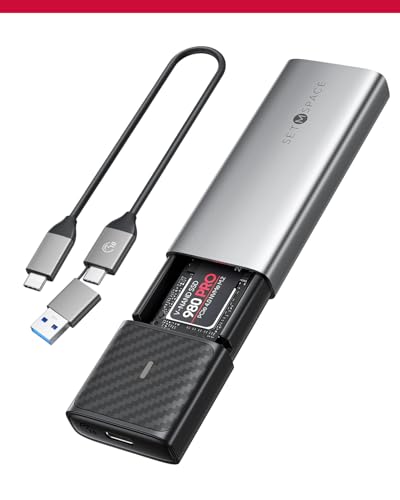
SETMSPACE M.2 NVME & SATA Enclosure, USB 3.2 Gen2 Adapter
Available immediately
free shipping
  • data transfer speeds up to 1064 MB/s read and 1051 MB/s write
  • compatible with NVMe and SATA SSD types including M key and M&B key
  • efficient heat dissipation with high-quality heat-conducting silicone, vest with grooves, and aluminium casing
Our rating
8,9
good
BENFEI M.2 NVMe SSD Enclosure, USB-C 10Gbps, 2230–2280
Available immediately
free shipping
  • data transfer rate of 10 Gbps via USB 3.2 Gen2
  • compatible with NVMe protocol M/B&M keys for 2230, 2242, 2260, and 2280 size SSDs up to 8 TB
  • aluminium alloy shell for enhanced structure stability and improved heat dissipation
Our rating
8,8
good
KingData 10Gbps M2 SSD Enclosure USB 3.1
Available immediately
free shipping
  • enables data transfer speed of up to 10 Gbps via USB C 3.1 interface, compatible with UASP, TRIM and S.M.A.R.T protocols for faster SSD performance
  • supports NVMe SSDs in sizes 2280, 2260, 2242, 2230, compatible with multiple operating systems including Windows, Mac OS, and Linux
  • constructed from sturdy aluminium alloy with groove design to enhance heat dissipation for improved performance and longevity
Our rating
8,3
good
DollaTek M.2 NVMe to USB Adapter
Available immediately
free shipping
  • data transfer speed up to 10Gbps USB3.2 Gen 2
  • compatible with NVMe M.2 interface 2230, 2242, 2260, 2280 SSDs
  • without enclosure cover for enhanced heat dissipation
Our rating
7,5
satisfactory

Similar Nvme USB Adapter comparisons

Nvme USB Adapters buying guide: How to choose the right product from the above Nvme USB Adapters test or comparison

Understanding NVMe USB Adapters: What They Are and Why You Need One

What is NVMe?

NVMe, or Non-Volatile Memory Express, is a protocol designed specifically for accessing high-speed storage devices, such as SSDs. Unlike traditional USB drives or older storage technology, NVMe offers significantly faster data transfer rates. Think of it as upgrading from a bicycle to a sports car—both will get you to the same destination, but the speed difference is remarkable. An NVMe USB adapter allows you to connect these high-speed SSDs to your computer through a USB port, making it an essential tool for anyone looking to improve their data transfer speeds.

Why Use an NVMe USB Adapter?

Using an NVMe USB adapter can dramatically enhance the performance of your storage solutions. If you’ve ever found yourself waiting several minutes to transfer large files, you’ll appreciate the benefits of the high-speed data transfer. This adapter not only saves time but also can boost your productivity, especially for tasks involving large video files, extensive gaming libraries, or significant database management. It’s a game changer for both professionals and casual users who want a seamless experience.

Key Features to Look For in an NVMe USB Adapter

Connection Type

When selecting an NVMe USB adapter, the connection type is a pivotal factor. Look for USB 3.1 Gen 2 or higher to ensure that you achieve optimum transfer speeds. The right connection type is akin to choosing a highway for a road trip; the smoother and faster the road, the quicker you reach your destination.

Compatibility

Ensure that the adapter is compatible with your NVMe SSD and your operating system. Most adapters support M.2 NVMe SSDs, but some can handle both key types (M and B). Think of this as making sure your charger fits your phone; compatibility is key to functionality.

Cooling Mechanism

An effective cooling mechanism is crucial as high-speed data transfers can cause your SSD to heat up. Look for adapters with an integrated heat sink. This feature is like having a cooling system in your car while driving fast—the cooler the engine, the better the performance during your drive.

Portability

If you plan to use your NVMe USB adapter on-the-go, consider its size and weight. A lightweight and compact design allows easy transport without compromising on functionality. Picture slipping it into your pocket, ready to use whenever needed.

Best NVMe USB Adapter Options for Everyday Use

Affordable Choices

If you’re on a budget but still want quality, there are several dependable NVMe USB adapters available that provide high transfer speeds without breaking the bank. Brands offering reliable and affordable options ensure you get decent performance for everyday tasks without overspending.

High-End Options

For those who seek exceptional performance and durability, high-end adapters typically come with advanced features, such as enhanced cooling systems and robust build quality. These options are ideal for professionals with demanding storage requirements, akin to choosing luxury over economy.

How to Choose the Right NVMe USB Adapter for Your Needs

Assess Your Requirements

Begin by evaluating what you primarily need the NVMe USB adapter for. Is it for backing up your data, transferring large files, or perhaps running applications directly off an external drive? Knowing your primary usage helps narrow down your options.

Consider Future Needs

It’s also wise to think about potential future requirements. If you plan to upgrade your SSD or expect to work with larger files, investing in a more advanced NVMe USB adapter might save you from having to upgrade later.

Setting Up Your NVMe USB Adapter: A Simple Guide

Initial Setup

Setting up your NVMe USB adapter is typically straightforward. Begin by inserting your NVMe SSD into the adapter. Make sure it’s seated properly to avoid connectivity issues. Then, connect the adapter to your computer using a USB port—it’s as simple as plugging in a standard USB drive.

Driver Installation (if necessary)

Some adapters may require you to install drivers for optimal performance. Be sure to check the manufacturer’s instructions and download any necessary files. This step is akin to updating your phone’s software; it ensures everything operates smoothly.

Testing Speeds

After setup, conducting a speed test is helpful to ensure you’re achieving the transfer speeds you expect. This can be done using various software applications. It’s like getting a speedometer reading after getting your car serviced—you want to confirm that everything is running efficiently.


Table of contents
  1. Understanding NVMe USB Adapters: What They Are and Why You Need One
  2. Key Features to Look For in an NVMe USB Adapter
  3. Best NVMe USB Adapter Options for Everyday Use
  4. How to Choose the Right NVMe USB Adapter for Your Needs
  5. Setting Up Your NVMe USB Adapter: A Simple Guide

Overview

1. Comparison winner
SABRENT M.2 NVMe/SATA SSD Enclosure EC-SNVE, 10Gbps
Our rating
9,8
very good
SABRENT M.2 NVMe/SATA SSD Enclosure EC-SNVE, 10GbpsAvailable immediately
2. Best value
UGREEN M.2 NVMe SSD Enclosure, USB 3.2 Gen 2, 10Gbps
Our rating
9,8
very good
UGREEN M.2 NVMe SSD Enclosure, USB 3.2 Gen 2, 10GbpsAvailable immediately
3. Bestseller
SSK M.2 NVMe/SATA SSD Enclosure USB 3.2 Gen 2 10Gbps
Our rating
9,8
very good
SSK M.2 NVMe/SATA SSD Enclosure USB 3.2 Gen 2 10GbpsAvailable immediately
UGREEN 10Gbps M.2 NVMe & SATA SSD Enclosure
Our rating
9,6
very good
UGREEN 10Gbps M.2 NVMe & SATA SSD EnclosureAvailable immediately
ACASIS M.2 NVMe and SATA SSD Docking Station
Our rating
9,6
very good
ACASIS M.2 NVMe and SATA SSD Docking StationAvailable immediately
iDSOniX M.2 SSD Enclosure Adapter
Our rating
9,5
very good
iDSOniX M.2 SSD Enclosure AdapterAvailable immediately
FIDECO M.2 NVMe SSD Enclosure, USB 3.2 Gen 2
Our rating
9,5
very good
FIDECO M.2 NVMe SSD Enclosure, USB 3.2 Gen 2Available immediately
UGREEN 10Gbps USB 3.2 Gen 2 M.2 NVMe SSD Enclosure
Our rating
9,3
good
UGREEN 10Gbps USB 3.2 Gen 2 M.2 NVMe SSD EnclosureAvailable immediately
Our product comparisons are:
Always up to date:
At most every 120 days, we update each category with new products and research developments in the top rankings. This ensures that our recommendations are always up to date
Neutral and independent:
Our tests and comparisons are objective and fact-based. Manufacturers have no influence on the ratings. We aim to provide greater transparency in the market, thereby promoting product quality.
Method-driven
In our tests & comparison tables, we only include products that meet our minimum standards. This ensures that you can find the perfect product for your needs from a wide selection.
Similar tests and comparisons - Technology Accessories